

 Contact Us
A customer searching for an older model may need a replacement part, a specification or reassurance that the new version will fit. A page that simply disappears cannot answer any of those questions. Yet keeping every retired product on sale is equally unhelpful. The difficult decision is what the page should become when the product can no longer be bought.
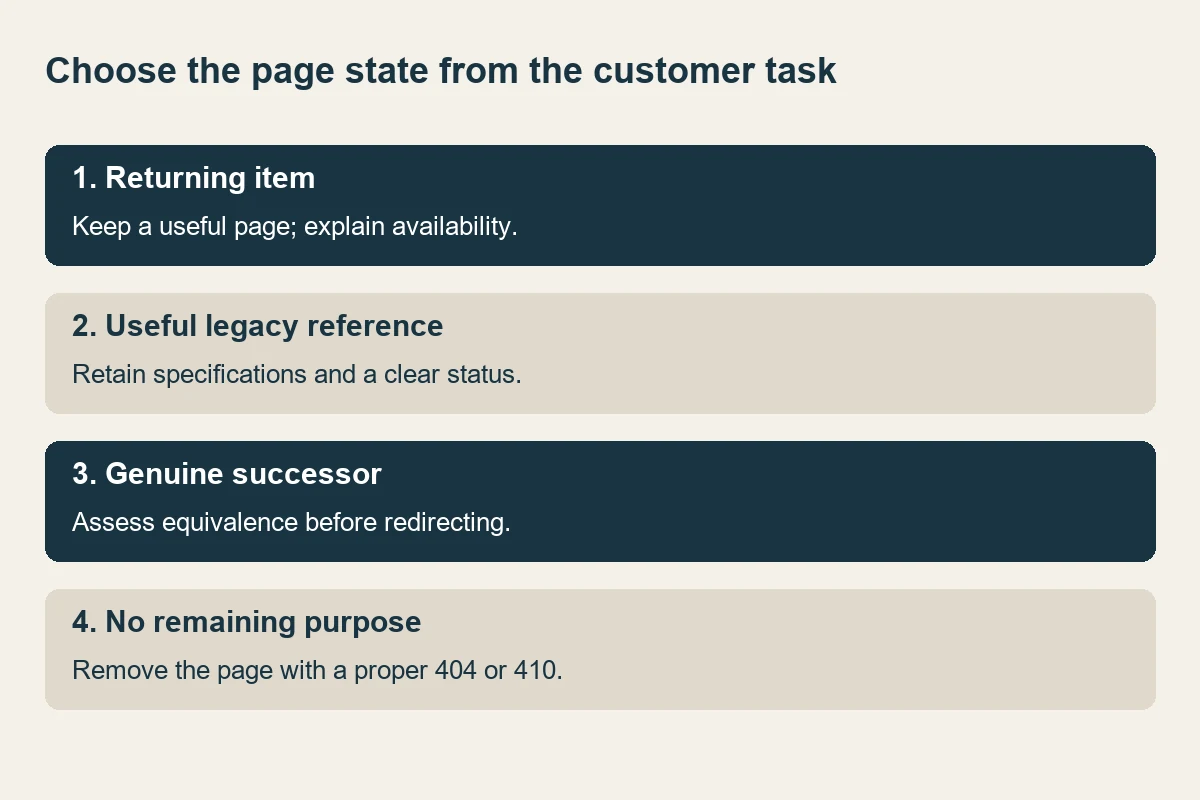
The direct answer: usually retain a useful product page during a temporary stock gap. For a permanently discontinued item, decide whether the old page still serves a real information need, whether a genuinely equivalent successor warrants a redirect, or whether removal is appropriate. Keep the customer message, purchase controls, structured data and merchant feed consistent with the decision. There is no universal rule that every unavailable product must remain indexed or redirect to a category.
This guide focuses on the editorial and search decisions around a product's lifecycle. It complements operational stock testing rather than replacing it. The examples are fictional planning exercises, not reports of WSC client results.
Classify the actual product state
Start with the merchandising decision, not a status-code spreadsheet. A zero quantity does not tell you whether the supplier is late, the season has ended, the model is being replaced or the business has stopped selling the category. Each situation creates a different customer expectation.
Temporary shortage, with no orders accepted
Keep the identity and useful details of a returning product accessible. Explain that orders are currently unavailable. Give a return estimate only when somebody owns the evidence behind it. If the supplier has not confirmed a date, a straightforward statement of uncertainty is more helpful than a countdown that resets every morning.
A stock notification can be a reasonable next action, provided it works and its purpose is clear. Do not suggest that entering an email reserves stock unless it actually does. Consider how someone can withdraw that request and what happens if the product never returns.
Backorder, preorder and a seasonal pause
Taking payment for an unavailable existing product is different from inviting interest in it. Backorder terms need a credible fulfilment process. Preorder concerns an unreleased product, not an old item waiting for replenishment. Google's Merchant Center availability specification distinguishes these states and requires an availability date for preorder and backorder submissions.
A seasonal item needs its own review date. Returning next year is a business expectation, not evidence that today's visitor can order it. Keep the description useful where justified, but remove stale delivery promises and campaign language. Assign a person to revisit the state before the next selling period.
Permanent discontinuation
Ask who confirmed the decision and whether it applies to one variant or the entire model. An unavailable blue finish should not automatically retire the black version. Similarly, a retailer no longer carrying a product does not necessarily mean its manufacturer has discontinued it. Use wording that accurately describes the business's own position.
For the transaction side of these distinctions, use the separate ecommerce inventory testing guide. Here, the question is what information and search destination should remain after the stock decision has been made.
Choose between retention, redirection and removal
The table below is a decision aid, not an automatic rule engine. A useful archive page and a valid replacement can both exist; the team still needs to decide which destination best answers the old visitor's task.
| Situation | Reasonable starting point | Evidence needed |
|---|---|---|
| Temporary shortage | Retain a substantive page with an honest availability message | Replenishment owner and a working next action |
| Retired product with continuing support needs | Retain an explicitly labelled reference page | Useful specifications, manuals or compatibility information |
| Old page replaced by a genuinely equivalent destination | Consider a permanent redirect | Documented match between the old task and new destination |
| Removed content without a suitable replacement or remaining purpose | Return a proper 404 or 410 | Removal approval and updated discovery paths |
Retain information because it helps someone
An older appliance page may answer whether a filter fits. A retired industrial component may still need a dimensional drawing. These are concrete reasons to retain content. A page consisting of a product name, an unavailable notice and unrelated recommendations has a much weaker purpose.
Evaluate the customer question directly. Could a support colleague point somebody to this page and resolve the issue? Are the facts maintained? Is the distinction between historic specifications and current offers obvious? Traffic and incoming links inform prioritisation, but neither turns misleading content into a good destination.
Judge a successor by equivalence
A higher model number is not sufficient proof of replacement. Compare the intended use, compatibility, dimensions, capacity and purchase context. A new product with a different connector may be a poor destination for somebody seeking the old connector's manual. Linking to that alternative from a retained page may serve them better than silently moving them.
When a permanent move is justified, implement a direct server-side redirect and verify its destination. Google's redirect documentation explains permanent and temporary signals. Keep the commercial reasoning beside the redirect mapping so a later catalogue update does not turn an initially sensible decision into an unrelated chain.
Allow real removals to be removals
Some pages have no remaining useful purpose. If the content is removed and there is no similar replacement, Google's crawling troubleshooting guidance recommends a 404 or 410 response. You can still provide helpful navigation on that response page.
Do not treat every reported missing URL as a defect requiring redirection. Equally, do not delete a whole discontinued collection without checking customer support dependencies. The useful unit of review may be a model family rather than every individual SKU, but the final rules must still handle exceptions.
Make retained pages useful
A retained page needs an editorial brief. Otherwise, an archive gradually becomes a second, less accurate catalogue. Define what the page helps someone establish, which information remains authoritative and who is responsible for corrections.
Put the availability message beside the action
Show the status where a shopper expects to order, including the selected variant. A small notice below a long description cannot repair an active-looking purchase control at the top. Check the mobile layout and keyboard path as well as the desktop screenshot.
For example: “We no longer sell this model. These specifications remain available for existing owners. See the compatibility notes before choosing an alternative.” This is clearer than “Sold out” when the business knows the item will not return. Adapt the wording to verified facts; do not imply manufacturer support that has not been confirmed.
Offer alternatives with useful differences
Recommend a small number of relevant choices and explain the tradeoff. “Similar capacity, different mounting dimensions” helps someone decide what to inspect. A carousel ordered only by margin or popularity can send a buyer towards the wrong product while appearing helpful.
Preserve the old model identifier, specifications and relevant documentation when they support the retained purpose. Label replacement links and archived downloads clearly. If a PDF has its own search audience, the PDF SEO checklist provides a separate workflow for making that document understandable and discoverable.
Keep claims tied to their period
An old “latest model” badge or warranty promise can outlive the offer it described. Review promotional blocks, delivery estimates, comparison tables and customer service scripts alongside the main description. Do not display a historic price as though it were a current purchasable offer.
Customer reviews also need context. Retaining genuine feedback about an older model can be informative, but transferring those reviews to a materially different successor risks confusing the reader. Decide how the interface will keep product identities separate before merging content for convenience.
Align data and discovery
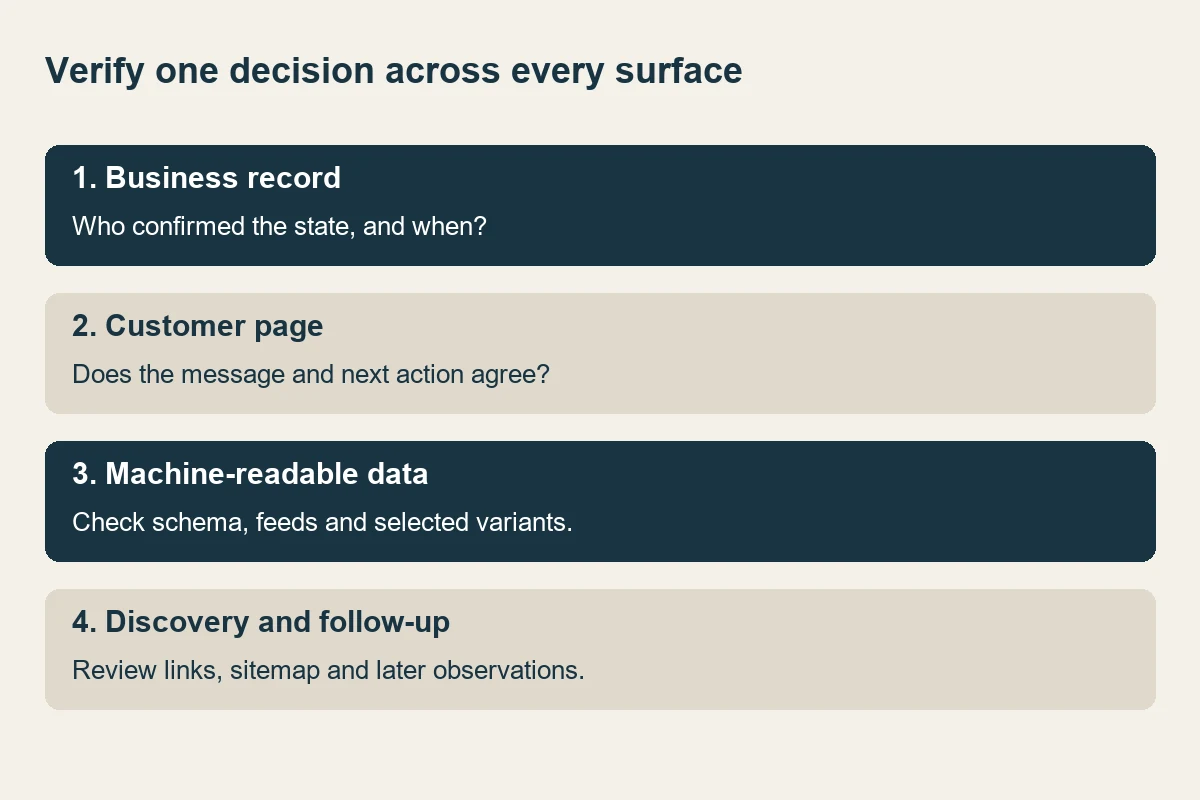
The human-facing page, search markup, merchant data and internal links are different surfaces. They should express one coherent decision, but they are not interchangeable. Removing a merchant offer does not necessarily require deleting a useful web reference page.
Check structured data against the actual page
Review the Product and Offer information emitted for the selected item. Availability, price and purchasability should reflect what the visitor can actually do. Do not leave an InStock offer in a shared template simply because the main purchase button was disabled elsewhere.
Use Google's product snippet documentation to check the applicable properties and validate representative pages. Correct markup creates eligibility for relevant search features; it does not guarantee their display. A retained reference page should not invent an active offer just to satisfy a validator.
Treat the merchant feed as a separate publication
If the underlying identifiers and attributes are unreliable, start with the product-data checklist before building lifecycle rules on top of them.
Google's availability guidance says permanently discontinued products should be removed from Merchant Center product data rather than indefinitely submitted as out of stock. Temporary gaps require the appropriate current state. Make sure a scheduled export does not recreate an offer that a colleague removed manually.
Check the export time, item identifier and selected variant when investigating a mismatch. Google's availability mismatch guidance identifies update timing as one possible cause. A website screenshot and a feed screenshot taken at unrelated times can obscure the sequence rather than prove consistency.
Update navigation without hiding useful knowledge
A discontinued item need not occupy a prominent position in a current shopping category. It may belong in a clearly labelled support or archive route instead. Check internal search, related-product widgets, old buying guides and links from manuals. Each should lead to the intended destination.
For URLs you want indexed, review sitemap inclusion against your canonical and publication policy. Google's sitemap guidance treats inclusion as a discovery signal, not an indexing guarantee. Remove redirected or deleted destinations from the active sitemap, and avoid changing modification dates merely because a routine export ran.
The HTTP status-code guide covers the response diagnostics in more detail. Keep this lifecycle review focused on why a particular response is right for the product and visitor.
Work through a catalogue example
Consider a fictional Delhi retailer selling replacement water filters. One cartridge is temporarily unavailable; another is permanently retired; a third fits equipment the retailer no longer sells. A blanket “hide products with zero stock” setting would treat all three alike.
The returning cartridge
The purchasing team confirms that replenishment is expected but cannot provide a reliable date. Retain the substantive page, show that orders are unavailable and offer a stock notification. Keep the existing product URL. Ask the operations owner to revisit the message after the supplier's next update.
The acceptance evidence includes the selected size, disabled ordering state, notification confirmation and matching machine-readable availability. It does not include a promise that Google will refresh the search presentation immediately.
The retired cartridge with a proposed successor
The proposed replacement has a different seal. The merchandising team initially wants a redirect because it is the closest item in the catalogue. Compatibility review shows that some existing housings need an adapter. The old page therefore remains as a reference, explaining that distinction and linking to the successor and adapter information.
This choice preserves a useful answer for an owner searching by old model code. It is not a claim that retaining the URL will produce more traffic than redirection. If a later product revision creates a truly equivalent replacement, reassess the decision with updated evidence.
The unsupported legacy item
The remaining page contains an obsolete description with no verified compatibility details or documentation. Support cannot identify a useful ongoing task. After checking links and approving removal, the team returns a proper missing-page response, removes current catalogue references and records why no replacement was chosen.
The exercise shows why stock quantity alone is too weak a trigger. The most valuable output is a small set of defensible rules with an exception route. Keep the record readable enough that a new merchandiser can understand the decisions months later.
Review a change before releasing it
Prepare a bounded batch with examples of every intended state. Include a product with several variants, an old URL with incoming links, a genuine successor and a support page that should remain available. Record the starting state before changing rules.
Keep a compact decision record
Useful fields are the product identifier, affected URLs, confirmed state, evidence owner, intended destination, visible message, feed action, schema action, navigation action, review date and rollback reference. Add a short reason. Avoid turning the record into an unmaintainable inventory of every page element.
Approve business facts before implementation. A developer should not have to guess whether a substitute fits or whether the supplier's return date is credible. A content editor should not be asked to certify a redirect response merely because the new page looks correct.
Design automation around reviewable exceptions
For a growing catalogue, separate the stock event from the publishing instruction. A quantity update can flag a page for review without deciding its permanent fate. Require an explicit lifecycle field for retirement, and restrict who can change it. Preserve the distinction between a supplier delay and a confirmed withdrawal even if both currently prevent ordering.
Agree what happens when evidence is missing. An unconfirmed successor should enter a review queue rather than receive an automatic redirect. A failed supplier import should raise an operational alert rather than mark thousands of products as permanently removed. The person investigating needs the original event, affected identifiers and previous state, with access limited appropriately.
Rehearse recovery on a small representative batch. If the rule assigns the wrong destination, can the team restore the previous message, URL behaviour and feed treatment together? Check whether downstream exports will overwrite that recovery on their next run. Record dependencies so rollback does not become a sequence of disconnected manual edits.
Finally, distinguish policy coverage from exception resolution. A dashboard showing every SKU processed says little about whether the decisions were correct. Review a sample of retained references, redirects and removals with someone who understands the products. Keep unresolved compatibility questions visible. Expand automation only when the team can explain the outcomes and maintain the underlying product facts.
Verify both immediately and later
After release, fetch the old and new URLs, inspect the response path and read the rendered content. Check the mobile action area, structured data, feed output, sitemap and internal discovery routes. Confirm that the next scheduled sync preserves the intended state.
Later, review relevant Search Console observations and merchant diagnostics alongside support enquiries and notification outcomes. Google's HTTP response documentation explains why a successful response alone does not guarantee indexing. Separate deployment correctness from the search systems' subsequent processing.
If the lifecycle policy is part of a redesign, add these states to the website design brief. Scope the templates and ongoing ownership before the new catalogue structure is approved.
Avoid common mistakes
- Redirecting every retired SKU to the homepage. This discards the visitor's specific task. Assess destination relevance individually or through a reviewed family rule.
- Keeping empty pages indefinitely. Retention needs a useful purpose and maintenance owner, not just reluctance to remove URLs.
- Changing the page but forgetting exports. A later feed sync or template render can restore inaccurate availability.
- Removing a whole model for one unavailable variant. Review the actual purchase unit and how its URL is selected.
- Inventing replenishment dates. A precise-looking estimate without ownership creates avoidable customer uncertainty.
- Confusing crawl controls with product status. Blocking access does not explain what the product has become or where a visitor should go.
- Measuring success only by retained rankings. Check whether customers receive accurate answers and whether the operational decision remains valid.
Use the product-page decision checklist
- Confirm temporary shortage, accepted backorder, seasonal pause or permanent retirement.
- Verify the affected model and variants with the merchandising owner.
- Identify the customer task that remains after purchasing stops.
- Document why retention, redirection or removal best serves that task.
- Check any proposed successor for material compatibility differences.
- Make the visible status and next action unambiguous on mobile.
- Align structured data and merchant exports with truthful current facts.
- Review category links, internal search, related items and sitemap inclusion.
- Test actual responses and the next scheduled synchronisation.
- Retain proportionate recovery evidence and assign a review date.
Make a proportionate decision
Unavailable products are part of running a catalogue. The goal is to give every affected destination an honest purpose: a returning offer, a useful reference, a relevant successor or a clear removal. Start with the customer question, confirm the business facts and then align the technical signals.
A small retailer can begin with a reviewed spreadsheet and a handful of representative products. A large catalogue may need governed automation and explicit exceptions. In either case, judge the policy by the accuracy of the experience and the team's ability to maintain it, without promising a particular search outcome.
Sources
Primary documentation checked on 26 November 2026. The decision workflow and fictional example are editorial recommendations, not universal Google requirements.
- Google Merchant Center: availability specification
- Google Merchant Center: availability mismatch diagnostics
- Google Search Central: crawling errors and removed content
- Google Search Central: product snippet structured data
- Google Search Central: redirects
- Google Crawling Infrastructure: HTTP status codes
- Google Search Central: sitemap guidance
Featured photograph: Ryan Klaus on Pexels, used and modified under the Pexels licence. The warehouse is illustrative stock photography, not a WSC client, project or inventory. The two process diagrams are original editorial visuals.