

 Contact Us

Two customers can see the same last item, add it to separate baskets and both believe it is theirs. The website may look polished throughout. The problem appears later, when your team has two orders and only one sellable unit. An ecommerce launch review should uncover that disagreement before customers do.
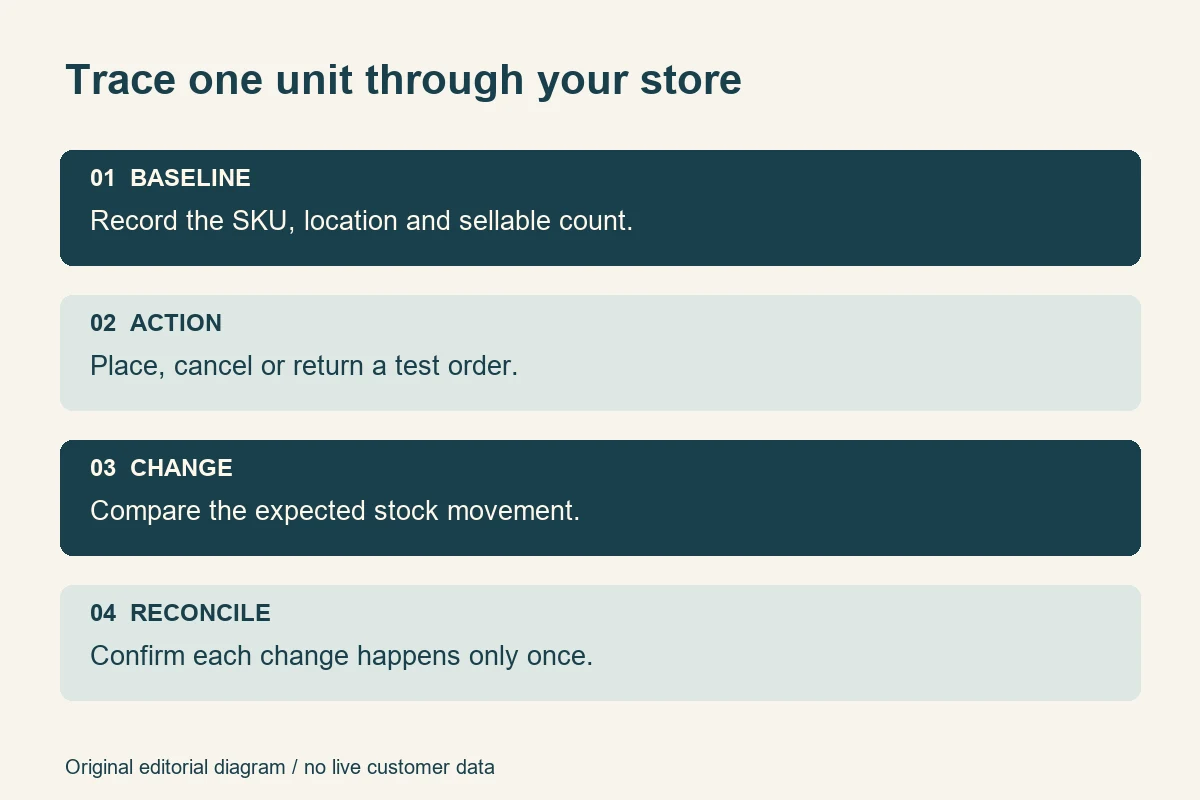
The direct answer: test inventory by following a specific SKU through an agreed sequence of stock changes. Start with a known sellable quantity, check the correct variant, place controlled orders, exercise the last-unit boundary, then verify cancellations, returns and synchronisation. Compare customer-facing availability with the authoritative stock record after each action. A green checkout message alone is not evidence that inventory works.
This guide is for business owners and teams commissioning an online store in India. It explains what to ask a development partner to demonstrate, what evidence to retain and where platform settings change the expected result. The examples are fictional test exercises, not WSC client findings or promises that software can eliminate every stock discrepancy.
Define what your store can sell
Start with the business rule rather than the administration screen. A unit on a shelf might be damaged, allocated to another order, reserved for a wholesale customer or waiting for inspection. Physical possession does not automatically mean permission to sell online. Your acceptance tests need the quantity the business has actually made available to this sales channel.
Ask the operations owner to explain which system makes that decision. It might be the ecommerce platform, an inventory application or an ERP. Record who can change quantities, which locations supply online orders and what happens when systems disagree. Avoid letting several systems overwrite the same quantity without a documented ownership rule.
Shopify's inventory-state documentation distinguishes available, committed, unavailable, incoming and on-hand quantities. Its terminology is useful for that platform; a custom build may use different labels. Translate the business rule into the installed system's actual states instead of assuming similarly named fields behave identically.
Separate overselling from intentional backorders
An oversell defect and an approved backorder are different outcomes. A business may deliberately accept orders for replenishable goods, provided the offer and fulfilment process support that promise. The test should establish whether purchasing beyond available stock is permitted for this exact variant, and whether the customer receives an honest explanation.
Shopify documents a setting that permits selling out-of-stock items. Do not enable it merely to make a failed test pass. Agree which products qualify, who approves the policy and what the storefront should say. A made-to-order item, a limited batch and a discontinued product should not inherit the same assumption.
Include these decisions when discussing ecommerce website design requirements. “Inventory included” is too broad to establish whether your team expects location-level stock, bundles, backorders or a single manually maintained quantity.
Prepare a controlled stock baseline
Use a staging store or an explicitly authorised testing arrangement. Do not consume live customer stock, send real fulfilment requests or create unplanned payments just to demonstrate a scenario. The payment provider, warehouse connector and notification services need suitable test settings, and someone must own restoring the baseline afterwards.
Create a small set of recognisable test products. Include a simple item, a product with independently stocked variants, an unavailable item and one item with approved backordering. If bundles or multiple locations are part of the contracted scope, add a representative example of each. Test data should reflect the store's rules without copying private customer records.
Record enough detail to repeat the test
For each case, write down the SKU, selected options, location, opening available quantity, relevant policy, expected movement and system of record. Record the starting time and environment. A screenshot of “5 in stock” without the item identity or location is weak evidence when someone later investigates a disagreement.
Freeze unrelated edits for the short exercise, or document them as events. If another tester changes the same product midway through a last-unit test, the result becomes difficult to interpret. Establish a reset procedure that restores both quantity and order state, not just the number visible in one dashboard.
Ask for a test record you can repeat after a theme, plugin or integration update. The goal is an understandable acceptance procedure, not a performance theatre that depends on one developer clicking through an undocumented path.
Test variants and quantity boundaries
A product page can show one generic availability label while its options have different quantities. Test the exact combination: size and colour for apparel, capacity for equipment, or pack size for packaged goods. Changing a selection must change the purchasable item, not merely the photograph or label.
WooCommerce supports inventory management at product or variation level, including mixed arrangements. That flexibility makes a written configuration important. Ask which options share a stock pool and which are independent. The correct answer depends on how the merchant actually fulfils those combinations.
For a fictional shirt, set the medium blue variant to two available units and the large blue variant to zero. Confirm that buying medium does not reduce large, and that switching to large does not preserve medium's availability. Test a direct link to the unavailable selection as well as navigation through the option picker.
Check the edges, not just one ordinary order
With a known quantity of two, try purchasing one, exactly two and more than two in separate resettable cases. Check quantity edits in the basket as well as the product page. Repeat on a phone, where compact controls may hide an error or leave the checkout button active after the quantity changes.
Include invalid input and a stale basket. The server should enforce the agreed stock rule even if a customer returns to an old browser tab or a front-end control fails. A disabled button is helpful communication, but it is not a substitute for authoritative validation at the point the platform commits inventory.
When the requested quantity becomes unavailable, check the message and recovery route. Does the customer know which item needs attention? Can they reduce the quantity without rebuilding the whole basket? Keep valid items intact where the design permits. Test readable feedback and keyboard operation alongside the numerical result.
Test the last unit and reservations
The most revealing small test is often the final unit. Use two independent browser sessions, one known available unit and a coordinated purchase attempt. Write the expected business outcome first: for an item that forbids overselling, no more than the permitted quantity should become accepted commitments. Inspect the saved orders and stock movement, not just the two browser messages.
This is a controlled acceptance exercise, not proof of capacity under every level of traffic. A developer may need additional concurrency testing appropriate to the architecture and expected load. Ask for that separately if a flash sale or limited release is an important requirement. Two browsers cannot certify unlimited simultaneous demand.
Find the actual reservation boundary
Do not assume that adding an item to a basket reserves it. Find out when the installed store holds stock, how long any hold lasts and what releases it. Settings, extensions and custom checkout behaviour can affect the sequence. Your test document should name the observed event rather than saying vaguely that stock changes “during checkout”.
WooCommerce's product inventory settings document a configurable hold for unpaid orders and distinguish that from other order states. Verify the configured behaviour on your own installation, including scheduled processing. Do not borrow another store's timeout as an assumed default or a recommended universal duration.
Exercise abandonment, a declined payment and a delayed confirmation only as stock events here. Does the unit remain held, become available again or move to another state according to the approved rule? Detailed money movement belongs in a separate payment and refund acceptance test. Connecting the two records helps diagnose errors without confusing financial success with sellable stock.
Check cancellations and returns without creating phantom stock
A cancelled order can release an unfulfilled commitment. A returned parcel can contain damaged goods that should not immediately become sellable. Treat those as separate events. Your warehouse process must determine when a physical item is suitable for resale, while the application must apply the chosen stock action accurately.
Shopify's refund documentation describes restocking as an available choice in the workflow. The practical lesson is to verify the operator's selection and resulting inventory separately from the refund. Returning money is not evidence that a physical unit has been received or inspected.
Verify the quantity, location and number of changes
Cancel an unfulfilled test order and inspect the approved release behaviour. Then repeat a partial cancellation or return: one item from a multi-item order, or one unit from a larger quantity. Confirm that the untouched lines keep their correct commitments and that the stock returns to the intended location.
Test a return that is unsuitable for resale. The operation should not increase online availability simply because a refund was issued. Document the manual inspection step or unavailable-stock state used by the business. A clear procedure can be appropriate; do not label an undisclosed manual dependency as an automated feature.
Finally, ask the developer to demonstrate safe handling of a repeated integration event in an isolated environment. A duplicate cancellation message should not create a second sellable unit. Record the order identifier, event and resulting movement. This requires technical evidence from the implementation, not repeated clicking of live refund controls.
Check locations and synchronisation
A store can have stock somewhere without having stock available for the online order being attempted. Test a unit at an eligible fulfilment location and a unit at a location excluded from online fulfilment. Compare the site's behaviour with the approved allocation rules. Keep delivery eligibility and charges in their own shipping acceptance worksheet.
For a business selling through a website and another channel, define how competing sales reach the stock authority. Ask who owns updates, how failures surface and how discrepancies are reconciled. Avoid claims of “real time” unless the integration has a measurable, agreed expectation and a method for checking it.
Exercise delayed and repeated updates
Have the developer simulate a delayed stock update, a repeated event and, where relevant, an older update arriving after a newer one. The intended outcome should follow the integration's documented rules. Keep these tests isolated so they cannot overwrite genuine inventory or trigger an actual warehouse instruction.
Shopify's inventory application documentation shows that integrations work with distinct quantity states. Its API details are implementation-specific; buyers mainly need evidence that the connector changes the intended state and retains enough history to explain a discrepancy. A generic “sync successful” badge cannot answer that question.
Agree a practical failure response: who receives the alert, where the last successful update is visible and when staff should stop selling an affected item. A bounded manual process can be safer than silently using stale data, but it must have an owner. Include this responsibility in ongoing support planning.
Include manual corrections and shared components
Not every quantity change comes from an order. Staff may discover a counting error, receive a delivery or remove a damaged unit. Use an authorised test adjustment to confirm who can change stock, what reason is recorded and how the revised quantity reaches the storefront. Check that ordinary catalogue editors cannot accidentally overwrite operational stock if their role should exclude that permission.
For a store selling multipacks or bundles, identify whether the offer has independent finished stock or consumes shared components. A gift set containing two mugs must not silently behave like one mug unless that is the agreed stock model. Write the relationship explicitly and test a sale of the set followed by a sale of a component. Reset the baseline between alternative configurations.
Do not assume a platform's standard product grouping implements every bundle rule. Extensions and custom work may be involved. Ask the developer to identify the responsible component, supported limitations and update dependency. If bundles are outside the agreed scope, record that exclusion rather than implying they were tested.
These cases are particularly useful when an offline sales team also enters orders. Agree whether a telephone order is captured in the same authority and when it reduces online availability. Reconcile one controlled example with the operations owner. Otherwise a correct website can still sell against a stock figure that nobody has kept current.
Retain a simple movement history for the exercise: opening quantity, each approved adjustment, commitments and closing sellable quantity. Explain any difference before moving on. The history need not use a particular report format, but it should let someone other than the original tester reconstruct the result. Finish by restoring the authorised baseline and confirming that no connected system will replay an old test adjustment afterwards.
Keep availability signals consistent without promising instant search updates
After a stock change, compare the product page, selected variant, basket and any published product-data output. Check that cached pages do not continue inviting purchases the authoritative store rejects. The useful acceptance question is whether each channel reflects the same approved availability rule within its documented update process.
Google's product-variant guidance explains identifying variants and exposing the correct selection. Use the Rich Results Test where relevant, but also compare markup with the visible product and chosen variant. Valid syntax cannot establish that the underlying stock quantity is correct.
Search engines and external feeds may take time to refresh. Do not promise that every search result will change immediately after the final unit sells. This section is an output-consistency check; it is not a substitute for the broader product-data readiness review. Never add artificial availability claims to pursue a richer result.
Run a buyer-witnessed exercise
Consider a fictional Delhi homeware retailer with one website and two storage locations. A blue mug has three sellable units at the online location. A second location holds two units that are not available to online orders. One chipped mug is physically present but excluded from sale. These are example inputs, not a recommended inventory structure.
Ask the operations owner to approve that baseline, then place an order for two blue mugs. Inspect the committed and available quantities in the actual platform terminology. Attempt an excessive purchase in another session. Cancel the first order under the approved restocking rule and verify that exactly the intended units return to availability.
Next, change the fictional mug to a separate variant with no sellable stock. Confirm that the original variant's restored availability does not leak into it. Repeat the boundary case through a direct product link and a saved basket. If a connector is involved, reconcile the website result with the authoritative system and retain both records.
For each failure, write a concise report: environment, SKU, opening quantity, steps, expected state, actual state, timestamps and relevant identifiers. Capture the smallest useful evidence and remove private customer data. Assign an owner and repeat the original failing case after correction. A different successful order does not close the original defect.
Avoid common mistakes
- Testing only a plentiful item: ordinary purchases rarely expose the last-unit boundary.
- Using the parent product as proof: independently stocked options need their own checks.
- Confusing stock with fulfilment: an available unit does not prove that the customer's address can be served.
- Restoring every return automatically: damaged or uninspected goods need the business's approved treatment.
- Ignoring stale sessions: an old basket must face current authoritative validation.
- Signing off a sync badge: reconcile actual quantities and identifiers instead.
- Leaving test residue: remove or close authorised test orders and restore inventory before real selling begins.
Use the launch checklist
Before sign-off, ask the business and technical owners to confirm the following against retained evidence:
- The stock authority, eligible locations and update responsibilities are named.
- Sellable, unavailable and incoming quantities have clear business meanings.
- Variant selection and independent stock pools behave as specified.
- Exact-stock, excessive-quantity and stale-basket cases have been tested.
- The last-unit outcome matches the approved overselling policy.
- Reservation and release events are documented and repeatable.
- Partial cancellations and returns change only the intended quantities.
- Duplicate events cannot produce an extra stock movement in tested cases.
- Integration delays have an observable failure and reconciliation process.
- Storefront and product-data availability are consistent with the approved rule.
- Unresolved defects have a severity, owner and launch decision.
- Test orders, external instructions and opening stock are reconciled before release.
Make a proportionate launch decision
Inventory acceptance testing establishes a defensible baseline: the store applies agreed stock rules to representative transactions, and the team can explain the resulting movements. It cannot remove supplier delays, inaccurate physical counts or every future integration failure. Keep that distinction visible in the sign-off.
Prioritise defects that sell unavailable units, change the wrong variant or create stock twice. Record smaller limitations honestly rather than hiding them in a general approval email. When planning a build, discuss your stock scenarios with WSC. A specific SKU, opening quantity and expected outcome give the conversation a useful starting point.
Sources
Primary documentation checked on 4 November 2026. Confirm installed platform versions, extensions and account configuration before applying platform-specific steps.
- Shopify: inventory states
- Shopify: selling out-of-stock products
- WooCommerce: inventory settings
- WooCommerce: variable products
- Shopify developers: inventory quantities and states
- Shopify: refunds and restocking
- Google Search Central: product variants
Image credits: illustrative warehouse photography by EqualStock IN and cottonbro studio, adapted under the free Pexels licence. These are not WSC client premises or evidence of a tested implementation. The stock-test diagram is original editorial artwork.