

 Contact Us

A website can display a reassuring security score while its enquiry form silently stops submitting. The reverse also happens: a working website keeps unnecessary script permissions because nobody wants to risk breaking the payment widget. Website security headers deserve a better commissioning process than copying a configuration and hoping.
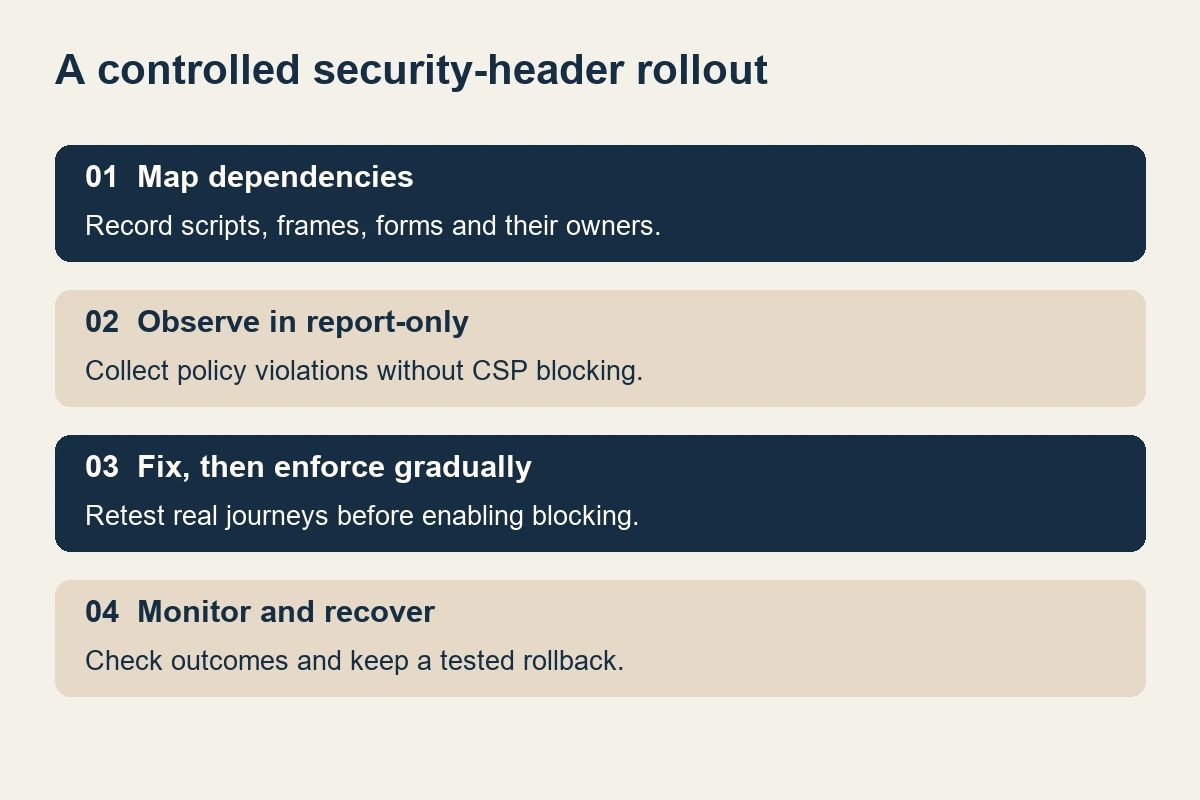
The practical approach is to inventory the website's dependencies, test a proposed Content Security Policy in report-only mode, investigate legitimate failures, then enforce a reviewed policy with monitoring and a recovery plan. Test the other headers against their own purpose. A header's presence, a scanner grade and a successful customer journey answer different questions.
This guide helps business owners, marketing leads and technical reviewers agree what evidence to request before approving a security-header rollout. It focuses on browser policies and compatibility. Application security, access control, updates and secure development still need their own work.
Define the outcome before choosing headers
Start with the business functions the release must preserve: submitting an enquiry, opening an account, displaying a product video, completing a booking or taking a payment. Then name the security concern being addressed. Restricting script execution, preventing unwanted framing and keeping browsers on HTTPS are separate outcomes.
A useful requirement might say: “Approved scripts can support the enquiry journey; an unapproved script is blocked under the enforced policy; the owner receives actionable evidence of unexpected violations.” That is more assessable than “enable all recommended headers”.
Include these expectations in the website design brief. Ask the supplier to identify changes needed in templates, third-party tools, hosting and ongoing support. A proposal should explain who maintains the policy when marketing adds a new service.
Set a realistic security boundary
CSP helps mitigate certain browser attacks, particularly cross-site scripting, by restricting what a page may execute or load. It does not repair an insecure database query or determine whether a user should access an invoice. OWASP's CSP guidance treats it as an additional security layer.
Agree whether the engagement includes a policy review, implementation, compatibility testing or a broader security assessment. Those deliverables require different evidence and effort. Do not let a successful header check become a claim that the entire website is secure.
Understand what each header controls
Buyers need enough vocabulary to ask useful questions. They do not need to select every directive themselves. The following map connects common controls to decisions your team can demonstrate.
| Control | Purpose | Evidence to request |
|---|---|---|
| Content-Security-Policy | Restricts page resources and execution according to its directives. | Reviewed policy, permitted dependencies and blocked unauthorised test behaviour. |
| CSP frame-ancestors | Defines which parent pages may embed this page. | Allowed partner embedding works; an unapproved parent cannot frame the protected page. |
| Strict-Transport-Security | Tells supporting browsers to use HTTPS for a remembered period. | Valid HTTPS, domain scope and a documented duration decision. |
| X-Content-Type-Options | With nosniff, limits MIME-type guessing and blocks incorrectly typed scripts or styles. | Correct content types and successful loading of required assets. |
| Referrer-Policy | Controls referrer information sent with requests. | Chosen disclosure level and tested external journeys. |
| Permissions-Policy | Controls access to selected browser features. | Required features work in supported target browsers; unnecessary permissions are constrained. |
Distinguish framing from loading a frame
frame-ancestors determines who can embed your page. frame-src controls the frames your page loads. Allowing a video player through one does not answer the other. MDN also explains that frame-ancestors has no default-src fallback and cannot be delivered through a meta element.
Document whether the business intentionally supports embedding, including a partner portal. Test the actual arrangement rather than applying a blanket restriction without checking the agreement.
Treat browser support as part of the specification
Permissions-Policy support varies across browsers and features. MDN marks the header as having limited availability. Specify the browsers your customers need and verify the relevant behaviour there. A feature restriction that works in one browser does not establish universal enforcement.

Build a dependency and ownership map
List the services each important page needs. Include scripts, styles, fonts, images, API connections, frames and form destinations. A homepage visit alone may miss a payment frame, a chat tool opened after a click or a CAPTCHA loaded only when the enquiry form appears.
Record the service name, purpose, pages used, responsible person and removal consequence. Separate essential operations from optional marketing. A retired tracking tag should not acquire permanent permission merely because it appeared during discovery.
For each dependency, ask: Is it still needed? Is its provider verified? Does it load additional resources? Which functionality fails if it is unavailable? Who approves a future change? The result should support a maintainable policy rather than a growing collection of unexplained exceptions.
Identify where the policy is actually set
Headers may be configured by application code, the web server, a hosting control or an edge service. Ask the implementation team to record the authoritative location and inspect what the public response delivers. An application setting is insufficient evidence if another layer changes the response afterwards.
Capture representative page responses before the change, including product pages, forms and error pages. Note environment and release identity. Keep the previous relevant configuration available for recovery. This small record makes a later discrepancy much easier to investigate.
Give the inventory a clear boundary. A small service website might prioritise its homepage, service template, enquiry page and confirmation route. A store may need additional account, cart and checkout templates. State which page families the sample represents and list any important exclusions. This prevents a review of four URLs from being presented as proof about every possible response.
Ask how a new dependency enters the register. A practical rule is to require its business purpose, supplier documentation, technical review and test owner before release. The policy can then evolve with the website rather than becoming an obstacle people routinely bypass.
Coordinate the inventory with cookie consent testing. A script that appears only after an optional consent choice still needs policy review. Permission under CSP does not establish that the visitor consented to its use.
Use report-only CSP as a rehearsal
A proposed CSP can be delivered through Content-Security-Policy-Report-Only. It records policy violations without enforcing that proposed restriction. MDN's CSP guide also explains that a report-only policy can coexist with an enforced policy. Record which one you are evaluating.
The essential buyer question is: “What would this policy block if we enforced it?” A working form during report-only testing does not prove that the same form will work after enforcement. The rehearsal reveals likely conflicts; it does not provide the proposed protection.
Turn reports into decisions
Ask the technical team to demonstrate that reporting works using a controlled test in the authorised test environment. Record the relevant directive, affected page and resource category. If reports are collected remotely, agree access, retention and removal of sensitive URL details. Avoid copying customer data into the evidence pack.
Review findings in groups. A required booking dependency may need a precise policy adjustment. An obsolete widget may need removal. An unexpected source may require investigation. Browser extensions and unrelated local conditions can also create noise; reproduce the issue in a clean test profile before assigning a website defect.
Do not automatically permit every reported source. Each exception needs a reason, an owner and a test. Equally, zero received reports is inconclusive if reporting was never validated or the important journeys were not exercised.
Schedule the observation around meaningful use rather than an arbitrary waiting period. Include the scheduled campaign component, the booking step and the consent-dependent video if those are in scope. A week of passive homepage traffic may reveal less than a carefully prepared session covering the full customer path. Record the actions completed so the reviewer can assess the evidence's limits.
Ask how scripts are trusted
MDN's implementation guidance recommends considering a strict CSP based on nonces or hashes. The engineering work may include refactoring inline handlers and other incompatible patterns. Ask the developer to explain the approach in the context of your templates and delivery system.
Do not accept a copied example with placeholder values as a completed implementation. Broad exceptions can weaken the policy substantially. If an exception remains necessary, document its effect and the planned improvement rather than presenting it as equivalent to the preferred design.
Test the journeys a scanner cannot approve
Prepare a compact test sheet with page, browser, user state, action, expected result, observed result and evidence. Use controlled accounts and test facilities. Prioritise the journeys that earn enquiries or complete transactions, then cover shared components and less frequent paths.
- Enquiry: open the form, trigger validation, complete CAPTCHA where used and confirm the authorised test submission reaches its intended destination.
- Booking or payment: open the embedded tool, complete its test journey and verify the resulting state in the designated test system.
- Content: load product images, fonts, video players and downloadable documents on representative pages.
- Interaction: test navigation, search, filters, mobile menus and content loaded after a click.
- Measurement: verify the agreed analytics actions under the correct consent states.
These are compatibility checks for the policy release. Existing payment, booking and enquiry acceptance requirements still apply. A successful browser action should be connected to the expected operational result rather than judged solely by a confirmation message.
Compare visible behaviour with browser evidence
Inspect response headers, network requests and console messages while repeating a failed action. Record the exact resource and policy involved. “The chat icon looks wrong” is a starting observation; a reproducible case identifying a blocked required stylesheet is actionable.
Check nosniff behaviour alongside asset content types. If a required stylesheet has an incorrect MIME type, correct the delivery issue. Removing a useful protection to conceal the symptom leaves the underlying configuration unresolved.
Referrer settings deserve their own test. Referrer-Policy controls the detail sent to destinations; for example, strict-origin-when-cross-origin normally reduces cross-origin disclosure to the origin on an HTTPS-to-HTTPS request. Keep confidential information out of URLs regardless, and verify partner journeys against the selected setting.
Write findings another reviewer can repeat
A useful finding names the test environment, policy version, browser, page, starting state and exact action. It then records the expected result, what happened, the relevant technical observation and the business consequence. Attach a small redacted extract where needed rather than a large uncontrolled export of browsing activity.
For example: “In the enforced candidate, selecting the product video after the approved consent choice leaves an empty player. The same steps work under the recorded baseline. Browser evidence identifies the blocked frame request.” This describes a reproducible difference without assuming that every console warning explains it. The engineer can then investigate and propose a focused correction.
Retest the corrected case and a nearby ordinary case. If a form destination changes, check both validation failure and successful submission. If a shared script rule changes, repeat representative pages using it. Keep the original finding and final disposition together so approval does not depend on someone remembering the demonstration.
Check content and measurement separately
If important content depends on JavaScript, compare the initial HTML with the rendered page after the policy change. Google's JavaScript troubleshooting guidance describes inspecting rendered output and resource errors using search diagnostic tools.
Use the JavaScript SEO checklist for that wider rendering review. The SEO concern here is preserving accessible content and functionality; adding a header is not evidence of a ranking improvement. Follow the separate analytics acceptance process when confirming measurement, because a rendered button does not prove an event arrived correctly.
Enforce in stages and plan recovery
Before promotion, ask the technical owner to identify unresolved findings, approved exceptions, affected routes and the rollback configuration. Test enforcement in a representative controlled environment. If staging and production use different providers or hostnames, document those differences and verify the actual public responses after the authorised release.
Choose a release window with someone available to investigate issues. Keep the policy change identifiable in the deployment record. Avoid simultaneously replacing several third-party services unless the project requires it; clear change boundaries make failures easier to trace.
Give HSTS a separate decision
HSTS persists in browsers for its configured duration. MDN explains that removing the header does not immediately erase a remembered policy. Disabling it with max-age=0 requires the browser to receive that response securely.
Before selecting a long duration, extending coverage with includeSubDomains or considering preload, inventory the affected hosts and verify HTTPS readiness. Include older portals that another supplier operates. These choices need a domain owner who understands their scope; they should not be selected merely to improve a scanner result.
Make monitoring an assigned responsibility
Agree who reviews new violations, how a broken essential journey is escalated and what evidence triggers a policy adjustment. Record how to distinguish the proposed policy from the active version. A recovery plan must account for the particular header's behaviour rather than assuming every change disappears on the next page refresh.
Connect this work to the website maintenance agreement. When a provider changes a widget or a marketing team adds a campaign tool, policy review and regression testing should have an owner and an agreed response path.
Set the escalation threshold around the consequence. A blocked essential enquiry or payment journey needs prompt attention. A reproducible issue on an optional component may permit a temporary documented workaround. Unexplained reports still deserve investigation, but their raw count alone does not measure customer impact or prove an attack.
For handover, keep one current policy record with its deployment location and latest accepted test evidence. Name the person who can approve an exception and the person who can implement it. Review the record when functionality or suppliers change, and retire obsolete exceptions after checking that the related dependency has actually gone.
Work through a practical example
Consider a fictional Delhi manufacturer with an enquiry form, optional product videos and a dealer portal hosted on a subdomain. Its supplier proposes a CSP rollout and stronger HTTPS policy. This example illustrates a review method, not a reported client outcome.
The team first maps dependencies. The enquiry requires a CAPTCHA service; videos load after a consent choice; an old advertising tag has no current owner. Report-only testing finds conflicts in all three areas. The reviewers retain the necessary services for technical assessment and remove the unused tag through the normal change process.
In enforced testing, the enquiry opens but submission fails. The engineer finds that the approved script can run while a required connection remains disallowed. The team corrects the relevant policy rule, repeats the full submission and confirms the test enquiry arrived once. They then repeat the video journey with the appropriate choice and verify required page content.
The domain inventory reveals that the dealer portal's HTTPS readiness has not been verified. The owner withholds approval for broader HSTS scope until that dependency is resolved. The final record names the enforced CSP version, tested browsers, accepted exceptions and support owner. No scanner grade substitutes for those decisions.
Avoid common rollout mistakes
Chasing a grade. A scanner can help identify omissions and suspicious settings. It cannot decide whether a partner should embed your page or whether an enquiry reached the CRM. Pair automated findings with the business test sheet.
Leaving the proposal in report-only indefinitely. If enforcement remains postponed, record the reason, owner and next review. Do not describe observation as delivered protection.
Allowing every source until warnings disappear. A quiet console achieved through broad permissions may defeat the purpose. Investigate each dependency and remove unnecessary code where appropriate.
Testing only the first page load. Menus, consent choices, modal forms and checkout steps reveal resources that the homepage does not. Repeat the actual sequence customers use.
Handing over a configuration without context. Future maintainers need the active version, configuration location, reasons for exceptions and recovery instructions. Otherwise the next routine integration can recreate the same uncertainty.
Use the approval checklist
- Each proposed header has a stated purpose, scope and responsible owner.
- Required and optional dependencies have been reviewed, with obsolete services addressed.
- The public response and authoritative configuration location are identified.
- Report-only collection has been demonstrated, and findings have documented decisions.
- The enforced candidate has passed representative enquiry, transaction and content journeys.
- Supported browsers, consent states and important interactions are covered.
- HTTPS readiness and subdomain scope support the chosen HSTS decision.
- Exceptions, monitoring, escalation and recovery are recorded.
- The authorised release receives a public-response and customer-journey recheck.
Keep the policy useful after launch
Good security-header work leaves the business with understandable controls and evidence that essential journeys still work. It also leaves a clear route for reviewing the next integration. The deliverable is a maintained policy with tested consequences, supported by a team that can explain its limits.
Before signing off, request the dependency map, reviewed policy, test results and recovery record. Those documents make the decision more useful than a screenshot of a green score and give future changes a dependable starting point.
Sources
Technical references checked on 25 November 2026. Browser support and provider requirements can change; verify the relevant documentation during implementation.