

 Contact Us

A visitor clicks “Reject optional cookies”, closes the panel and carries on reading. The banner disappears, so the demonstration looks successful. But did the website actually change what it stores and sends? A screenshot of the closed panel cannot answer that question.
The direct answer: test website cookie consent as a sequence of observable states. Agree what may run before a choice, after acceptance, after rejection, after a custom selection and after withdrawal. Then compare the visible preference, stored state, tag behaviour and network activity under repeatable browser conditions. Keep evidence for each transition, including returning visits and failures.
For an Indian business commissioning a website in 2026, this is a practical acceptance task. A domestic service site and an exporter serving several markets may need different approved rules. The business and its advisers must decide those rules; this guide explains how to verify implementation. It does not determine legal obligations or certify compliance.
The focus here is preference enforcement across the website. Event naming, conversion definitions and reporting belong in the separate GA4 acceptance-testing guide. A correct analytics event does not prove a correct consent journey, and a lower reported visitor count does not prove a defect.
Write the expected behaviour before opening DevTools
“Install a cookie banner” describes a component. It leaves unanswered which tools the banner controls, what each category means, whether optional services load initially and how visitors change their minds. Put those decisions into the project scope while the implementation can still respond to them.
Define a state sheet the business can read
For each category, list its purpose, included integrations, approved default, effect of acceptance, effect of rejection and behaviour after a later change. Include the preference storage itself. Name the person who approves the classification and the person who implements it. Developers should not have to guess whether a marketing integration is essential.
Specify the audience and environments covered. A staging site, production site, subdomain and hosted checkout may use different containers or providers. Record any approved regional variation explicitly. Do not assume a Delhi office test represents every visitor simply because the banner looks the same.
Describe the expected result in observable terms. For a particular optional video provider, a requirement might say that its player is replaced by a local placeholder until the relevant choice permits loading. The placeholder should explain the choice and offer a usable route to preferences. That is testable; “privacy-friendly video” is not.
Choose the Google consent implementation deliberately
Google distinguishes basic and advanced consent mode. Broadly, basic blocks Google tags until consent, while advanced can load them under denied defaults and send cookieless measurements. Those are materially different technical behaviours. Neither label makes the business decision for you.
Consequently, do not write “no requests after rejection” unless that is the actual approved requirement for the integration being tested. Conversely, do not excuse an unexpected marketing request just because somebody mentions consent mode. Identify the destination, payload, consent state and chosen design before deciding whether a result passes.
Record the approved approach in your website design brief. Include scope for third-party services and server-side collection where present. A browser panel can show part of the chain; it cannot independently prove everything a receiving server does.
Inventory everything that can run outside the banner
Ask for a list of analytics, advertising, chat, maps, video players, personalisation, session-recording and other embedded services. Check templates as well as the tag manager. A tracking snippet pasted into a landing-page plugin can bypass an otherwise carefully configured container.
Give each integration a named owner and loading route. Is it inserted by the theme, an application module, a tag-manager container, a content editor or a vendor embed? Identify who can add another instance later. This turns an unexplained request into a traceable implementation question.
Review storage beyond visible cookie names. Local storage and other browser mechanisms can hold application state, while requests may transmit information without creating a cookie. A cookie scan is useful inventory evidence, but it does not establish the complete data flow or demonstrate that withdrawal works.
Separate a preference record from business-critical session behaviour. Rejecting optional tools should not silently empty a cart or break a requested enquiry unless that is a documented and justified dependency that the business has resolved. Test those relationships rather than putting every cookie into one convenient category.

Test the preference states and the transitions between them
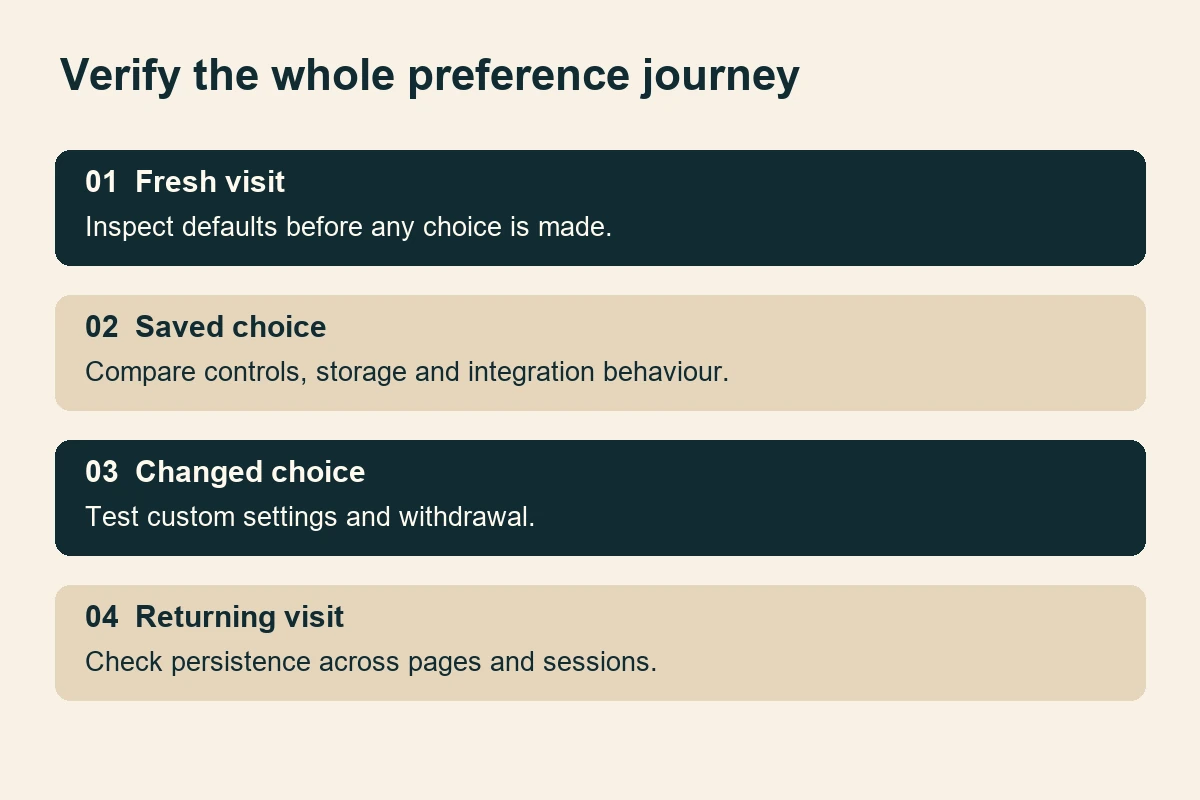
First visit without a decision
Start with a fresh browser profile or a deliberately cleared test context. Open the network recorder before navigation so that the initial requests are visible. Visit a normal page and a direct campaign landing page. Wait long enough to observe delayed integrations, then scroll and interact without selecting a preference.
Compare what happens with the approved default. Check that defaults are applied before dependent tags can act. Google’s implementation guidance explains the ordering of consent defaults and updates. An update arriving later cannot make an earlier transmission never have happened.
Reject optional categories
Select rejection and record the exact time. Check that the stored choice, category controls and affected integrations agree. Reload, navigate to another template and reopen preferences. A panel that remembers rejection while another page loads an excluded service has failed the agreed journey.
Test whether dismissing the panel has a separately defined meaning. Closing a dialog, scrolling or clicking a background link should not acquire an invented meaning during development. If the specification is ambiguous, resolve it before accepting the implementation.
Accept and customise
In a separate clean context, accept the permitted categories. Verify that the intended services start without duplicate initialisation. Then run a custom selection: allow one optional category and decline another. This is where broad “accept all” demonstrations miss incorrect category mapping.
Reopen the settings and read each switch. Its visible position, accessible label and actual effect should correspond. Save without changing anything, then change one category. Check whether the update takes effect in the current document or requires a clearly communicated reload. Preserve that expected behaviour in the acceptance sheet.
Withdraw a previous choice
Accept first, use a controlled feature, then reopen preferences and withdraw the relevant permission. Watch subsequent actions and page loads. The test asks whether future behaviour follows the changed choice; it cannot prove that data previously transmitted has been deleted elsewhere.
Ask the implementer to explain existing-cookie handling. Cookie removal depends on the relevant scope and implementation, and scripts cannot directly access HttpOnly cookies. The MDN cookie guide describes these mechanisms. Keep browser cleanup, stopping future collection and any separate data-deletion process distinct in the evidence.
Collect evidence that explains what actually happened
A useful record connects four observations: what the visitor selected, what preference the application stored, what consent state the integration received and what the browser subsequently did. No single screenshot establishes all four.
Inspect requests and storage together
Use the browser’s network tools to review destinations, timing and initiators. Chrome’s network inspection guide explains how to inspect individual resources. Keep the request timeline across the choice where needed, and identify which action produced each observation.
Check stored cookies through the Application panel, including their domain, path and expiry. Chrome documents these fields in its cookie inspection guide. A preference saved on one host or path may not govern a different part of the journey. Compare actual scope with the documented architecture.
Record browser version, extensions, test location, URL, release identifier, starting storage state, choice and expected outcome. Browser protection or an extension may block a request independently of your banner. A quiet network log under those conditions does not prove the application itself prevented collection.
Use vendor debugging without treating it as universal proof
For Google tags, follow the official Tag Assistant troubleshooting steps. Verify the earliest default and the update after interaction. Check the relevant consent parameters rather than accepting a connected status as evidence that every category works.
The same session does not validate every non-Google embed or a server-side pipeline. Request separate evidence for those integrations. If inspection cannot explain an unfamiliar endpoint, record an unresolved question with an owner. Avoid declaring either success or a privacy incident from a hostname alone.
Keep test evidence proportionate and access-controlled. Request exports can contain identifiers, query strings or submitted information. Use synthetic test data, redact unnecessary values and share only what reviewers need. The evidence should let the team reproduce a finding without distributing customer records.
Turn a finding into a reproducible test row
A strong finding describes the starting state and the sequence, not simply the final screen. For example: a fresh browser profile opens the service page, the reviewer declines optional categories, saves, follows the contact link and opens the embedded map. Under the fictional approved design, the map should remain a placeholder. Instead, its provider receives a request when the contact template loads.
Attach the relevant timestamp, destination and initiator, together with the visible saved preference. Ask the developer to trace the loading route. The corrective action might involve a template embed outside the consent integration; changing the banner wording would not address that cause. After correction, repeat the same steps on the same release candidate before expanding the sample.
Include a positive counterpart. Accept only the relevant category and confirm that the map now loads as intended. A fix that disables the map for everyone may remove the unwanted request while breaking an agreed customer feature. Paired positive and negative cases help distinguish correct enforcement from blanket removal.
Use a short evidence label such as “contact-map / optional declined / production candidate”. Keep the test data and expected result beside that label. Someone joining the project later should be able to understand the outcome without replaying a meeting or asking the original reviewer what the screenshot meant.
Follow ordinary customer journeys across pages and devices
A preference centre often works on the homepage and fails on the less frequently reviewed pages. Sample service pages, articles, landing pages, forms, product pages and checkout entry points. Include templates with maps, videos or chat because their dependencies may differ.
Returning visits, tabs and subdomains
Close and reopen the browser under the agreed persistence rules. Revisit a bookmarked deep link. Check expiry using a controlled test configuration rather than changing the device clock casually, which can affect unrelated security behaviour. Record how the site handles a missing, expired or unrecognised preference version.
Open another tab before changing a choice, then interact with it after the change. Establish the expected synchronisation behaviour rather than assuming it is instantaneous. If a separate checkout domain needs its own mechanism, make that boundary explicit. Do not promise that every browser or device shares the same choice.
Also test navigation without full reloads where the site uses client-side routing. An integration loaded after a route change must still respect the active state. Use back and forward navigation after changing preferences, looking for stale controls or scripts that reinitialise against an outdated value.
Mobile and keyboard operation
On a narrow screen, check that all choices remain readable and reachable when text is enlarged. Open preferences while the on-screen keyboard is visible elsewhere in the journey. Ensure the panel does not hide its save control below an inaccessible area or prevent access to explanatory links.
If settings use a modal dialog, check focus entry, keyboard movement and focus return against the W3C modal-dialog pattern. This focused test complements a broader website accessibility audit; it does not replace one.
Unavailable or slow consent services
With the developer, simulate the consent script failing or arriving slowly in a test environment. Verify the approved default and whether customers can still read content and complete essential tasks. A timeout should not silently become permission unless the approved specification explicitly supports that behaviour.
Repeat after deployment because staging and production may differ in containers, cache settings and templates. Limit live checks to controlled journeys authorised by the business. Tests should not create genuine advertising audiences, customer messages or purchases accidentally.
Agree what happens when the configuration changes
Ask what triggers a new preference decision when purposes or providers change. A version number in storage is only useful if the application has a defined response to an older value. Demonstrate the agreed update path using a test configuration, including what the visitor sees and what runs while the new choice is pending.
Also record who controls the consent platform account and tag-manager publishing permissions. A business should be able to obtain its configuration and evidence when suppliers change. Keep a targeted export of the approved settings with the release notes, and identify any provider subscription dependency rather than discovering it when a renewal fails.
After launch, schedule a retest when an affected integration changes, a new template is introduced or the consent configuration is revised. Prior evidence remains useful as a baseline, but it describes the release that was actually examined. It does not automatically cover new scripts or a different audience configuration.
A worked sign-off exercise for a service website
Imagine a fictional Delhi exporter with service pages, a contact form and an embedded product video. The approved test specification blocks the optional video provider before permission and permits a basic analytics implementation only after the relevant acceptance. These are example project requirements, not universal rules.
The reviewer begins with a clean profile on a direct service-page URL. The expected outcome is readable content, usable navigation and a local video placeholder. After rejection, the form should remain usable, the placeholder should remain and the preference should persist on the next page. The reviewer records requests and storage alongside the visible state.
Next, the reviewer accepts video but declines analytics. The player should load according to the agreed category mapping while analytics remains blocked under this fictional design. If both integrations activate, the finding is a category-mapping defect. Record the exact choice, page and requests; a vague note saying “cookies broken” will make retesting harder.
Finally, the reviewer withdraws video permission, reloads and revisits the page. The agreed placeholder should return and future provider loading should follow the revised choice. The report explicitly excludes any claim about deleting earlier provider-side records. After a correction, rerun the initial and custom cases as well as withdrawal to catch regressions.
A practical launch checklist
- Approve purposes, categories, defaults, geographic scope and the implementation approach.
- Inventory scripts, embeds, containers and any server-side collection with named owners.
- Test a clean first visit before clicking any preference control.
- Test rejection, acceptance and at least one mixed category selection.
- Verify changing and withdrawing a previously saved choice.
- Inspect requests, stored state and integration-specific consent evidence together.
- Repeat across templates, returning visits, relevant domains and navigation types.
- Check mobile readability, keyboard operation and persistent access to settings.
- Demonstrate the approved behaviour when the consent service is unavailable.
- Retain dated evidence, unresolved limitations and a release-specific sign-off.
For each failed row, record severity, owner, correction and retest result. Treat collection outside the approved design as a release decision requiring explicit resolution. Cosmetic spacing can be tracked separately when the choices remain clear and operable. Agree those priorities before a launch deadline makes every finding contentious.
Common mistakes that weaken the test
Equating a banner with enforcement
A plugin installation receipt or polished settings panel proves very little about scripts injected elsewhere. Require evidence from the actual templates and integrations. A general scanner can help discover candidates, but its output still needs interpretation against the approved state sheet.
Using one browser session for every case
Saved preferences, cached resources and extensions can change the result. Keep a controlled clean baseline and a separate returning-visitor sequence. Do not clear storage halfway through a withdrawal test and then claim the site removed it automatically.
Treating consent mode as a legal verdict
Consent mode adjusts supported tag behaviour. Its presence does not approve your categories, wording, audience assumptions or data practices. Keep technical findings precise and ask the appropriate business or legal reviewer to settle policy questions.
Forgetting later content and marketing changes
A new campaign pixel, video widget or CMS embed can introduce another loading route after launch. Include consent-impact review in change control. The maintenance agreement should identify who reviews these additions and who retests affected states.
Make the launch decision from the evidence
Good consent testing leaves the business with a comprehensible account of what happens before and after each choice. It also records boundaries: which integrations were covered, which environments were observed and which questions require another reviewer. That is more useful than a badge implying that every future change is safe.
Start with the real integrations your site needs, specify their expected behaviour and test the awkward transitions. If the team cannot explain a request after rejection or show that a changed choice persists, resolve that uncertainty before sign-off. Bring the integration list and one representative customer journey to a website project discussion so testing can be scoped around observable outcomes.
Sources
Technical references reviewed on 16 November 2026:
- Google: consent-mode overview, website implementation and troubleshooting.
- Chrome DevTools: cookie inspection and network inspection.
- MDN: using HTTP cookies. W3C: modal-dialog interaction guidance.
- Illustrative workspace photography by Hanna Pad, used and adapted under the free Pexels licence. No client, endorsement or measured result is implied.