

 Contact Us

A customer follows your sale banner, adds the advertised product and enters the code. The checkout rejects it. Another customer finds that the same code works twice alongside an automatic offer. Both journeys can look perfectly normal during a presentation that tests only one basket.
Ecommerce discount testing means proving that a promotion applies to the right customer, products, quantities and dates, calculates the agreed saving, and remains consistent as the basket changes. Before launch, approve a written offer rule, test qualifying and nonqualifying baskets, check combinations and expiry, and retain evidence of the resulting order totals. A working coupon field alone proves very little.
This guide is for Indian business owners and marketing teams signing off a new store or preparing a promotion. The examples are fictional acceptance exercises, not WSC client results or recommended pricing policies. Use them with your developer and commercial owner to settle what the offer actually promises before customers encounter it.
Write the offer rule before opening the coupon editor
Start with a sentence a customer could understand: “Save 10% on selected full-price accessories when eligible merchandise reaches Rs 2,000, up to a maximum saving of Rs 300.” Then ask what every part means. Which accessories? Is the threshold assessed before another offer? Does a sale item contribute to it? Does the cap apply per order or per customer?
If those answers are missing, the developer cannot infer them safely from a banner. The marketing owner should approve customer-facing wording and the finance owner should approve the calculation basis. The implementation team should identify which requirements are native features and which depend on custom code or an extension.
Put this definition in your website design brief. A promotion described only as “coupon functionality” leaves too much room for a demonstration to pass while the commercial rule remains unimplemented.
Record the conditions that change the answer
- Offer identifier, public code and responsible owner.
- Eligible products, variants, categories and excluded sale lines.
- Percentage or fixed saving, cap and quantity treatment.
- Minimum spend, its calculation basis and currency.
- Customer restrictions, total uses and permitted repeat use.
- Start, end, store time zone and approved combination rules.
- Customer message when a condition is unmet.
Separate your intended policy from platform behaviour. For example, Shopify documents specific amount-off threshold rules, including treatment of eligible merchandise and earlier product discounts. Do not assume the same threshold calculation on another platform. Ask the team to show how your chosen configuration implements your written offer.
Likewise, a shipping saving is a separate promise from a merchandise reduction. If your banner combines both, list each condition separately. That gives customer support a usable explanation when a shopper qualifies for one benefit but not the other.
Build a test matrix around boundaries, not random baskets
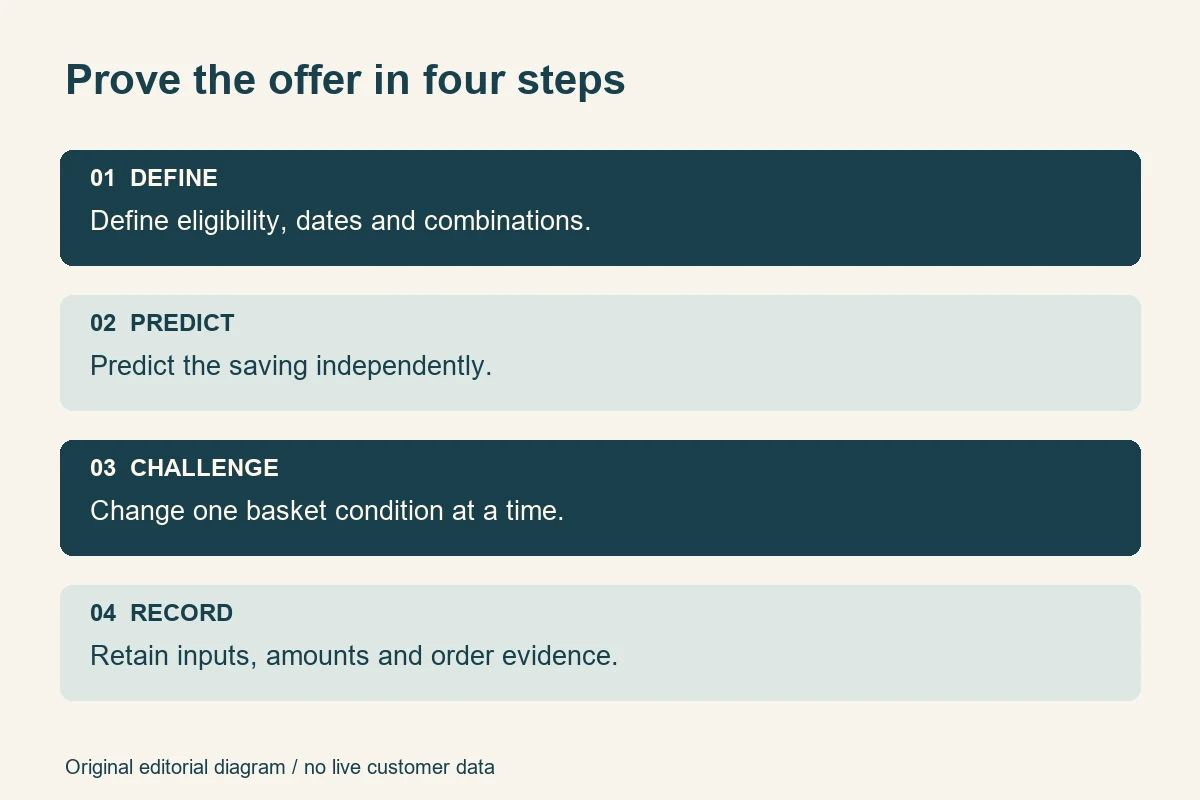
A good acceptance matrix deliberately changes one condition at a time. Begin with a basket that clearly qualifies, then make the smallest change that should remove eligibility. That approach makes a failure easier to explain than a large cart containing many unrelated products and several active offers.
For a Rs 2,000 threshold, test Rs 1,999, exactly Rs 2,000 and Rs 2,001 using the agreed calculation basis. If your prices support paise, use the smallest relevant increment instead. These are invented test values; substitute amounts that match your actual catalogue and offer.
| Test | Controlled change | Evidence to retain |
|---|---|---|
| Threshold boundary | Just below, equal to and above the qualifying amount | Eligible subtotal and decision |
| Mixed basket | Add an excluded product to eligible merchandise | Which lines received the saving |
| Quantity change | Increase then reduce an eligible line | Updated saving and eligibility |
| Combination | Apply a second code or automatic offer | Allowed result or clear rejection |
| Expiry | Test around the configured end time | Time zone, timestamp and outcome |
| Reuse | Repeat an action with a controlled test customer | Usage decision and order reference |
For every row, write the expected answer before running it. “Discount works” is not an expected answer. “This excluded line receives no discount, while the qualifying line retains Rs 120 off” is something a reviewer can compare with the screen and the stored order.
Capture the product identifiers, variant, quantity, starting price, customer state and active offers. A screenshot without those inputs can be impossible to reproduce after the catalogue changes. Keep test records free of real customer addresses, payment details and private account data.

Check the mathematics independently of the website
Use a small worksheet or calculator to establish the expected result. Copying the number from checkout into a test record simply repeats the system's answer. The independent calculation is what lets the buyer challenge a plausible-looking total.
Separate the merchandise calculation from the final payable amount
Suppose a fictional basket contains two eligible items at Rs 1,200 each and an excluded item at Rs 500. Under an illustrative rule granting 10% off eligible merchandise, the eligible base is Rs 2,400 and the saving is Rs 240. The excluded item remains Rs 500. Merchandise after this discount is Rs 2,660, before any separately configured tax or delivery treatment.
Now reduce the eligible quantity to one. Under a policy requiring Rs 2,000 of eligible merchandise, the offer should cease to apply. If the excluded Rs 500 item is counted instead, the implementation and written policy disagree. The important result is the reason for that disagreement, not whether one outcome looks more generous.
Have your accountant confirm tax presentation and the treatment required for your actual transactions. This guide does not prescribe GST calculations. The acceptance record should state whether displayed prices include tax and which totals the team has approved for comparison.
Distinguish a fixed basket saving from a saving on every item
“Rs 100 off” can mean Rs 100 off the whole basket or Rs 100 off each eligible unit. With three units, those produce different answers. Check the configuration label, public wording and line allocation together. WooCommerce's core coupon documentation distinguishes percentage, fixed-cart and fixed-product coupons and describes their restrictions. Use the documentation for your installed version and extensions rather than borrowing assumptions from another store.
Test rounding with a low-priced item, several quantities and a mixed basket. Ask where fractions are rounded and how line discounts reconcile with the order discount. Record the accepted result to the currency precision the store uses. A discrepancy of a small amount can still reveal a rule being applied at the wrong level.
Also challenge a saving larger than the eligible merchandise value. Your agreed behaviour should prevent an unexplained negative payable amount. Gift cards, store credit and loyalty balances require their own policy; do not silently treat every balance as another percentage coupon.
Challenge combinations, eligibility and offer limits
A coupon tested in isolation may behave differently when an automatic offer is already active. List the offers customers can encounter together, including product markdowns, automatic discounts, loyalty benefits and shipping promotions. Mark each pair as allowed, prohibited or requiring a specific result.
Shopify's combination guidance separates product, order and shipping discount classes and describes eligibility limits. Combination support depends on the actual merchant configuration. A plan name or an enabled checkbox is not sufficient evidence that every proposed offer pair behaves as expected.
Use small examples to expose the calculation order
For arithmetic only, consider a Rs 1,000 eligible amount and two reductions of 10% and 20%. Applying both percentages to the original amount saves Rs 300; applying the second after the first saves Rs 280. Neither is a universal statement of platform behaviour. Choose the intended rule, confirm the supported implementation, and test the resulting amount.
Try the codes in both entry orders. Remove one, refresh, then reapply it. Add an excluded product and change quantity. The final result should follow the supported offer policy rather than depend accidentally on the sequence of clicks.
Test customer restrictions without using real customer identities
Prepare controlled accounts representing an eligible customer, an ineligible customer and any relevant guest journey. If an offer is for first orders, agree what “first” means and when the system consumes eligibility. A failed checkout, cancelled order and completed purchase may need different treatment under your policy.
For one-use codes, ask whether the limit is global, per customer or both. Test the same customer's repeat attempt and a second eligible customer separately. A specialist should assess abuse resistance and concurrent redemption where financial exposure warrants it; a short buyer demonstration is not a security audit.
Keep error messages useful without exposing private eligibility details. Customers should understand whether to change their basket, sign in or choose another offer. Support staff need an internal explanation that is more precise than the public rejection message.
Test the whole shopping journey, including changes of mind
Start from the actual promotional link or banner. Check that the landing page explains the same conditions the checkout enforces. Then follow an ordinary mobile journey, entering the code, changing a line and returning to the product page. Repeat with a clean session so a previously applied offer cannot disguise a broken entry route.
Verify recalculation after every meaningful change
A cart should not retain an invalid saving after the qualifying item disappears. Test removing that item, changing its variant, reducing its quantity, logging out and returning after a saved basket is restored. Where a change affects eligibility, the revised total and explanation should appear before the customer commits to payment.
Delivery charges can interact with discounted subtotals. Set the offer's shipping-threshold basis explicitly and coordinate that check with your shipping acceptance tests. Keep the discount exercise focused on promotion eligibility; serviceability, delivery promises and rate configuration belong in that separate test set.
Keep the final order consistent with the approved basket
Where authorised, complete a controlled test order using the platform's supported testing method. Compare the final cart, order record and customer confirmation. The saving should be traceable to the offer and reconcile with the approved merchandise calculation. Ask the team to explain any allocation across order lines.
Use a separate payment and refund test plan for gateway outcomes and money movement. Here, the narrow question is whether the promotional amount recorded on the order matches the price the buyer accepted. A successful payment does not answer that question automatically.
Discuss partial cancellations and returns with the commercial owner. If a return removes the qualifying item, your customer policy and system capability need to agree on the outcome. Record the intended treatment before launching the offer; do not invent it during a support dispute.
Keep advertised prices and search data honest
A public sale price and a conditional coupon are different customer promises. If a saving requires a code, membership or a minimum basket, make that condition clear wherever the offer is advertised. Do not present a restricted price as the amount every visitor can pay for a single item.
For stores submitting product data to Google, review the Merchant Center sale-price requirements. Google describes how sale prices should be submitted and matched to the shopping experience; sale annotations are not guaranteed. Evaluate a conditional promotion against the relevant programme's rules rather than copying its lowest possible basket outcome into a public price field.
Check the product page, listing card, cart, checkout and any active product feed for the same controlled product. Inspect the rendered page and its underlying price data with the developer. A stale feed or cached banner may continue advertising a price after the offer has ended.
Give expiry its own test. Record the store's configured time zone, the advertised deadline and the timestamp of the attempt. For an Indian campaign marketed as ending at midnight IST, an admin setting using another time zone deserves explicit review. Do not change the server clock to test it; use an approved short-lived test offer or a safe testing environment.
The technical-SEO objective is accurate, consistent product information and useful promotion pages. This test does not guarantee a ranking, rich result or sales improvement. Avoid creating numerous thin pages for nearly identical coupon codes simply to target variations of the same search query.
Run a buyer-witnessed exercise before sign-off
Choose one planned promotion with a manageable product set. Schedule a review with the commercial owner and developer, using approved test data. Ask someone who did not configure the offer to run the steps; that person is more likely to notice an unstated assumption.
- Read the approved offer rule aloud and confirm any ambiguous condition.
- Open a fresh session and assemble the baseline eligible basket.
- Calculate the expected saving independently and enter the code.
- Make one boundary change, such as dropping below the threshold.
- Try the approved second offer and an explicitly prohibited combination.
- Restore the baseline and complete the permitted order-evidence check.
- Record results, defects, owners and the exact retest needed.
Keep an evidence sheet containing the offer version, environment, product identifiers, test customer type, timestamps, expected amounts, actual amounts and order reference where applicable. Store screenshots alongside the relevant row. A private sheet is usually more useful than a long recording that nobody can search.
Classify a wrong payable amount, an offer applying to excluded products and a materially misleading banner as launch blockers until the responsible owner resolves them. A minor wording improvement can be tracked separately when eligibility and customer understanding remain clear. Make that decision explicitly rather than silently downgrading a defect to meet a date.
Retest the failing case and a nearby passing case after each fix. Disabling a coupon may remove one wrong discount while breaking the advertised offer for everyone. The regression check establishes that the repair preserves the intended promotion.
Make the handoff usable for customer support
Give support staff the final offer summary and an example of an accepted and rejected basket. They should be able to identify the promotion version, reproduce the customer's conditions with safe test data and route a calculation problem to the right person. Avoid asking a shopper to send private payment information to prove that a coupon failed.
Define a simple escalation path for launch day. Who can pause a misleading banner? Who can disable a broken offer? Who approves an alternative customer remedy? Record those responsibilities without distributing unrestricted administrator access. The aim is to shorten uncertainty when the commercial promise and technical result disagree.
After changing an offer, repeat the relevant acceptance rows and record a new version. An extended end date, newly included collection or additional customer group is a functional change. The previous approval cannot demonstrate behaviour that was never tested.
For stores using more than one currency, add an explicit currency column to the matrix. Ask whether thresholds and fixed savings are converted, separately configured or unavailable in a particular market. Use the platform's documented capabilities and the business's approved market rules. A correct rupee test does not prove that the same promotion behaves correctly for a visitor shopping in another currency.
Finally, define how the team will close the exercise. Remove controlled test customers and test offers according to the agreed retention policy, while retaining a redacted sign-off record. Confirm that cleanup has not disabled the actual campaign. This leaves a compact reference for the next promotion without carrying unnecessary personal data forward.
Common mistakes that leave promotion defects hidden
- Testing only a large qualifying basket: include exact thresholds and excluded products.
- Using checkout as the calculator: establish an independent expected amount first.
- Ignoring automatic offers: review active combinations and test code entry order.
- Leaving time zones unstated: align the public deadline with the actual configuration.
- Approving a screenshot without inputs: retain products, quantities, customer state and offer version.
- Testing only desktop: make sure mobile shoppers can find the code field and understand rejection messages.
- Keeping test promotions live: deactivate controlled test offers and confirm the planned commercial offer remains correct.
Another mistake is asking the developer to decide a business policy through trial and error. Technology can enforce a cap or an exclusion, but someone authorised must own that promise. Unresolved commercial questions belong in the sign-off record with a named decision-maker.
A practical launch checklist
- The promotion has one approved written rule and a named owner.
- Eligible and excluded lines, threshold basis and maximum saving are explicit.
- Below, equal and above-threshold cases have recorded results.
- Fixed, percentage, quantity and rounding calculations reconcile independently.
- Customer restrictions, reuse and combination rules have been challenged.
- Basket edits remove or update savings when eligibility changes.
- Store time zone, start and expiry match customer-facing wording.
- Order records and confirmations preserve the accepted promotional amount.
- Public prices and any active product data reflect the actual offer conditions.
- Blocking defects are fixed, regression-tested and signed off.
Launch an offer your team can explain
You do not need hundreds of random baskets to start finding meaningful problems. You need a clear rule, a small set of deliberate boundary cases and evidence that someone can reproduce. Expand that set when your catalogue, customer restrictions or promotion combinations make the risk more complex.
Ask your ecommerce website development team to include promotion acceptance in the delivery scope. If your planned offer needs custom conditions, discuss the requirements with WSC before committing to a design or extension. The useful outcome is a promotion whose promise, calculation and customer journey agree, with limits that everyone understands.
Sources
Official platform and product-data references checked on 5 November 2026. Features vary by configuration, installed version and extensions. The worksheets, arithmetic examples and review process above are original illustrative editorial guidance.
- Shopify: amount-off discounts
- Shopify: combining discounts
- WooCommerce: managing core coupons
- Google Merchant Center: sale price
Image credits: illustrative photographs by Polina Tankilevitch and Jahra Tasfia Reza, adapted under the free Pexels licence. They do not depict WSC customers, client projects or actual acceptance tests. The workflow diagram is original editorial artwork.