

 Contact Us

A shopper sends back one pair of shoes from a two item order. The courier marks the parcel delivered, the store account still says pickup pending, and the only pair in the requested replacement size sells while the warehouse waits to inspect the return. Each team can point to a screen that says its part worked. The customer still has no clear answer.
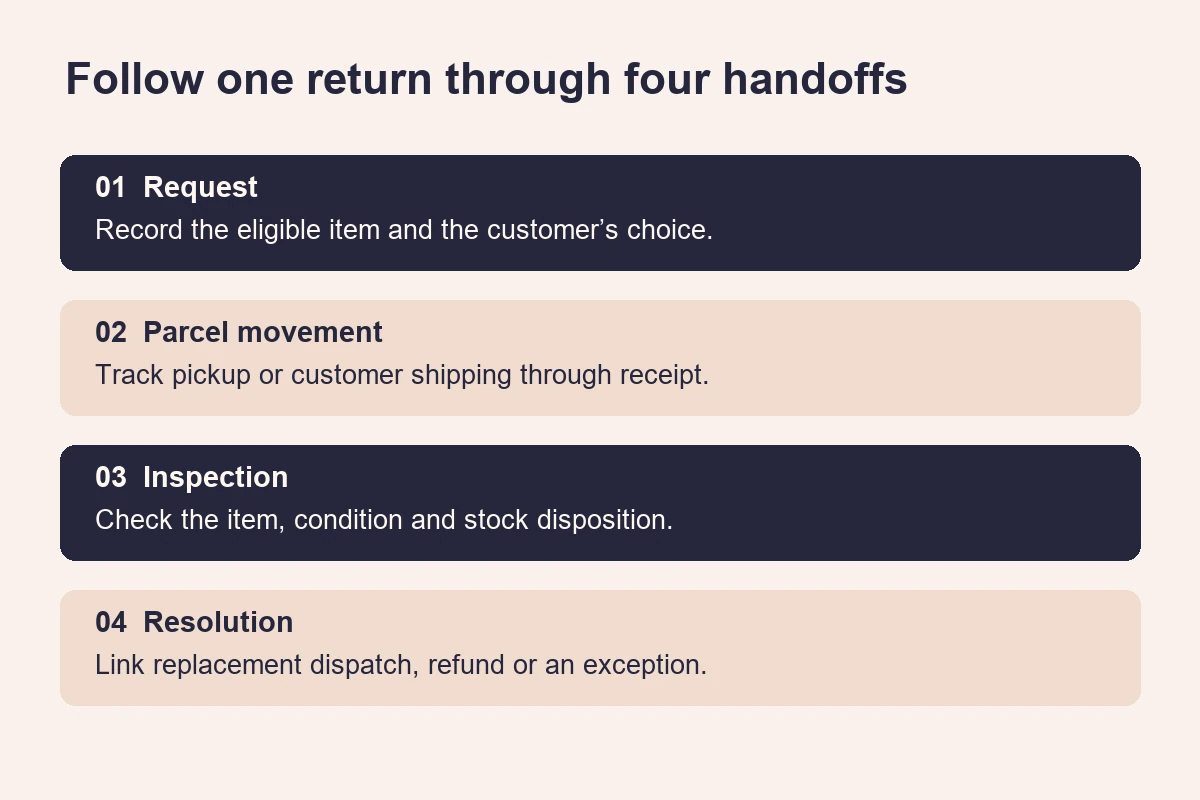
To test ecommerce returns and exchanges before launch, take a real test order from delivery through eligibility, request, transport, inspection and resolution. Use the same order in the storefront, support queue, warehouse system and payment record. Check who can move it to the next state, what the customer sees, and what happens if a parcel or replacement takes a different path from the one you expected.
This guide is for store owners, product managers and ecommerce teams accepting a new return portal or updating an existing one. It starts after an item has been delivered. Keep payment-provider settlement checks in the separate payment acceptance plan and use this exercise to find out whether your teams reach the correct resolution in the first place.
Map the return states
Start by drawing the route the customer can actually take. A return request asks the merchant to take back an item. An exchange adds a replacement to that journey. A refund moves money back to the customer. These events can occur hours or days apart. If the site uses the word returned for all three, a shopper may reasonably think the refund is on its way while the warehouse is still waiting for the package.
Shopify’s returns and exchanges documentation separates the physical return, the refund and the replacement. Use that distinction even if your store has a custom workflow. Ask the developer to show which screen or integration creates each event and which people or services can change it. A customer should be able to tell the difference between a request received, an approved return and an item the merchant has physically received.
| Event | Evidence to ask for | Customer question it answers |
|---|---|---|
| Request submitted | A request reference tied to order lines and quantities | Did the store receive my request? |
| Request approved | A decision record and the next step for handover | How do I send this back? |
| Parcel received | A warehouse receipt linked to the same request | Does the store have my parcel? |
| Inspection complete | Accepted quantities, discrepancies and item disposition | Which items did the store accept? |
| Resolution started | A replacement order, refund reference or documented exception | What happens next, and when should I check again? |
Record the owner beside each transition. If the courier reports delivered but no warehouse scan follows, a named operations owner should see an exception. Give the shopper an accurate progress update and a support route. Showing the courier event can be useful as long as it is clearly identified as such.
Test eligibility at the item level
Write test orders from the policy your team approved
Read the published policy with someone from support and someone who configures the store. Identify the trigger that starts the window, the time zone that sets the cutoff, the merchandise exceptions and the allowed outcomes. Write an expected answer for each test order before touching the portal. This gives the tester an independent reference when the site and the admin give different answers.
With a split shipment, a single order date can hide two delivery dates. Decide which date the implementation should use and test both parts of the order separately. Shopify’s return rules documentation describes options based on each item’s delivery or the final delivery, with fallback behaviour when delivery data is unavailable. It also describes how rule changes apply to future orders. Confirm the setting on your actual store and keep a pre-change test order beside a post-change one.
For a store serving India, use a boundary case with a time expressed in IST if that is the timezone the business has agreed to use. Test just inside and just outside the cutoff. Include a missing delivery event and see whether the shopper can get help when the system has insufficient data to decide. If a customer can see the request date but cannot see how the cutoff was calculated, give support enough information to explain it from the order timeline.
Prove that line items and quantities are enforced
Use a basket with two units of one variant, another variant that cannot be exchanged under the agreed policy, and a third item delivered separately. Request one unit first. Reopen the portal and try to request the same unit again. A useful result shows the quantity still available for a new request, preserves the existing request reference and prevents the total requested quantity from exceeding what the customer can return.
Check what the portal does with bundles, promotional gifts and items whose listing has since changed. Match each case to an approved business decision. If a product title or image was edited after purchase, the support team still needs enough order information to identify the exact size, colour and quantity the buyer sent back. For basket-level promotions, use the calculation evidence from the ecommerce discount testing guide when reviewing the expected figures for a partial return.
Follow the request through pickup and receipt
Start where customers look for help
Open the order confirmation on a mobile phone, find the account or order-status link and start a request without a staff member directing you. Try the path an account holder takes and the one available to a guest purchaser. If guest requests need assistance, check that the help route explains what information the shopper should provide and where to send it. In either case, use a second test identity to check that a person cannot access another shopper’s order or label by changing a reference in the URL.
Try a slow connection, a refresh after submitting, and a second attempt from another tab. When a request has already been recorded, the shopper should be able to recover its reference without starting a second case. Check the support queue as well. One visible confirmation is only half the evidence if retries created several staff tasks or several pickups behind the scenes.
Have a staff user approve one request and decline another with a reason the customer can understand. Shopify’s guidance on managing self-serve requests illustrates the difference between receiving a request and approving it with instructions. Whatever system you use, verify the actual permissions for the staff role handling requests and confirm the same decision appears on the customer side.
Test the way the parcel will actually travel
Where doorstep pickup is part of your process, test a serviceable and a non-serviceable PIN code. Use the address the customer will hand over the parcel from, since it can differ from the original delivery address. Check who can correct it, what happens to the old booking when an address changes and how the shopper learns about a failed pickup. Outbound delivery coverage is a separate question. The shipping serviceability guide can help you structure the address tests while you obtain the return courier’s own coverage rules.
If your fallback is customer-arranged shipping, follow the instructions from a phone. The customer needs the correct destination, an understandable packing instruction and a way to associate the parcel with the request. Give support a path for entering tracking or investigating a parcel with no reference. At the warehouse, scan a parcel with a known request and then one with a missing or unreadable label. Keep the second parcel in an exception queue until a staff member can verify which case owns it.
Replay a carrier event twice and send another event out of order in a test environment. A stale update should not make a parcel that was already inspected look as if it is waiting for pickup. Record the carrier event time and the time it reached your store. Those two fields give operations a way to explain lag and distinguish a delayed message from a new physical event.
Check inspection and replacement stock
Inspect before moving returned stock into the sellable pool
Give the warehouse one intact item and one with a discrepancy. Ask the operator to record what was requested, what arrived, the quantity accepted and where the received goods went. A damaged or unmatched item can enter a holding location while staff review it. Test that this movement does not raise sellable availability and that the correct variant is restored only after the agreed inspection step. Use the inventory acceptance guide for related tests on availability and simultaneous orders.
Try a parcel containing only one of two items in an approved request. The system should distinguish the unit that has arrived from the one still outstanding. Ask support to open the request and explain the difference using the record alone. If all they can see is a green completed badge, the case history needs more detail before they can handle a real discrepancy.
Make the replacement commitment explicit
Decide when a replacement is reserved and when it is released. Reserving at approval may give a shopper more certainty but can hold scarce stock while a parcel is in transit. Allocating after inspection keeps units available for sale for longer but can leave a customer without the requested size. Either approach needs a clear message, an agreed timeout or escalation, and a test in which another buyer tries to order the last unit.
Check the exact replacement SKU and fulfilment location. If the original item was collected in Pune but the replacement is held at another warehouse, the exchange may require a separate shipment and a new tracking reference. Make sure both records point back to the same customer case. Review which address is used for the replacement and how an authorised staff user can correct it before dispatch.
Try an approved return that becomes a refund after replacement stock runs out. Preserve the original request and record the customer’s choice. The screen should make clear whether money is expected, which method the business will use and whether the transfer is pending. WooCommerce’s refund documentation distinguishes a manual refund recorded in the store from money actually returned. A completion message should reflect evidence from the relevant payment or finance process, especially where an off-platform step is required.

Reconcile cases when a handoff fails
Ask operations to run a reconciliation at the end of the rehearsal. Start with all cases that the carrier says it delivered and compare them with the warehouse receipts for the same period. Do a second pass for accepted items that have no replacement shipment, refund record or active exception. Include the case reference in each list so the person reviewing it can open the underlying order directly. Agree how long a mismatch can wait before someone investigates, and demonstrate what happens when it passes that point.
Next, suspend one test integration after a valid event has been produced. Restore the connection and check whether the event is recovered by a retry, a scheduled reconciliation or a staff action. Then repeat that recovery step. The same return should remain attached to one customer case and the stock or payment action should appear only once. When the vendor cannot reproduce an outage, record the limitation and ask the operations owner to demonstrate the manual recovery with a sample case instead.
Give staff enough history to correct a mistake without erasing the evidence. For example, if a parcel was matched to the wrong request, ask a supervisor to move it to the correct one and check both order histories. Confirm who performed the correction, when it happened, and what the customer sees after it. If the first match already triggered a refund or a replacement, require a separate review of that action. Moving the parcel record to another case cannot undo a payment or recall a parcel that has left the warehouse.
Run a worked example
Consider a fictional footwear store that allows a size exchange within ten days of delivery and reserves a replacement only after inspection. A shopper buys two pairs in a single order. The first arrives in Bengaluru on Monday and the second arrives on Thursday. The store has agreed to calculate eligibility per delivered item. On the following Wednesday the shopper requests a different size for the second pair.
- Request. Verify that the portal evaluates the second item using Thursday’s delivery, accepts one unit and issues a single case reference. Retry the submission. Confirm that the same case is recoverable in the order history.
- Approval. Staff approve the request. The customer sees the return instructions and a statement that the size will be confirmed after inspection. No dispatch promise is sent at approval.
- Transit. The carrier sends its delivery event. The customer can see that the parcel reached the return destination. Operations still has a pending receipt to reconcile if the warehouse scan does not arrive.
- Inspection. The warehouse receives and accepts the correct unit. The inspector records its condition and confirms whether it can return to sellable stock. The replacement size is now unavailable because another order used the last unit.
- Resolution. Support contacts the shopper with the agreed choices. In this exercise the shopper chooses a refund. Staff record the choice and link the relevant transaction when it exists. The customer receives a status that distinguishes initiation from completion.
Save the request ID, item delivery date, warehouse scan, stock event and resolution reference in the test record. Attach screenshots with personal data removed. Repeat the same case with replacement stock available to prove the normal path too. The evidence should let someone who missed the demonstration reconstruct both outcomes in order.
Use the launch checklist
- Compare customer policy, portal eligibility and support instructions for each test basket.
- Test split deliveries, missing timestamps, the last eligible day, excluded products and partially returned quantities.
- Check mobile and guest entry, another user’s access boundary, repeat submissions and staff permissions.
- Follow approval or refusal through customer messaging, pickup or self-shipping, failed collection and warehouse receipt.
- Record item condition, mismatched parcels, partial receipts and the decision to quarantine or restock.
- Test the last replacement unit, a lost reservation, a changed address and the alternative resolution.
- Compare storefront, support, carrier, warehouse and finance evidence before closing the test.
- Assign a named owner and a retest date to every unresolved exception. Record what the shopper will see while that exception is open.
Use a short row per case with the test order, line reference, expected transition, observed state, evidence location and decision. Use separate rows for the customer and staff outcomes when both need sign-off. A pickup can be booked successfully while the customer has received incorrect instructions. Recording both results makes that problem visible at review.
Avoid common mistakes
Demonstrating the portal with an admin-created request
Staff tools can bypass the eligibility checks that customers experience. Start with an ordinary shopper account and test a rejected case too. Then repeat the case from support to make sure the staff route has its own controls and records who made a decision.
Closing the case as soon as the carrier marks it delivered
The carrier scan and the item inspection answer different questions. A box can reach the warehouse with the wrong product inside. Keep a clear distinction in the status shown to customers and use a discrepancy queue with enough information for staff to investigate.
Restocking the original item when the replacement is issued
The original and replacement are separate stock movements. Compare each against the correct variant, location and approval event. This is particularly important when a returnable unit goes into quarantine but the replacement can still be shipped.
Testing messages without testing the next action
Open every link in the message as the recipient on a phone. Check whether expired links lead to a recovery route and whether contact details still work. A polished message that sends the customer to a sign-in loop leaves the same support gap as a missing email.
Decide what is ready
A smaller store can start with a well-run assisted return process. A self-service portal makes sense when the team can support its eligibility decisions, exceptions and status updates consistently. Judge either approach by what the shopper can understand and what staff can prove from the same order record. If the team cannot reconcile a partial return, explain a delayed pickup or recover from a missing replacement, keep that path out of automatic approval until its owner can demonstrate the fix.
Put the expected return and exchange cases into your ecommerce website design scope before accepting the build. Bring one awkward real-world scenario to the project discussion and ask to see the evidence from the customer’s first click through the final resolution.
Sources
- Shopify Help Center — Returns and exchanges for the distinction between returning goods, replacements and payments.
- Shopify Help Center — Return and cancellation rules for rule timing, delivery date options and eligibility.
- Shopify Help Center — Managing self-serve requests for approval and staff handling.
- WooCommerce documentation — Refunding orders for automatic and manual refund distinctions.
- Illustrative photos by Artem Podrez and Hanna Pad under the Pexels licence. They depict general parcel handling and desk work.