

 Contact Us

A customer completes a website action, sees a reassuring message and waits for an email that never appears. Your team checks the application and finds a green “sent” status. Both observations can be true. The website may have handed a message to a provider without proving that the customer can find, understand or act on it.
Before launch, test transactional email as a complete customer communication journey: confirm the correct trigger and recipient, verify the sending identity, trace the message through the application and provider, inspect controlled inboxes, check content and replies, and demonstrate what happens when delivery fails. Keep the evidence separate from promises about inbox placement.
This guide helps Indian business owners, project managers and marketing teams commission those checks. It covers operational website messages such as acknowledgements and status updates, rather than newsletter strategy. The examples and acceptance worksheet are illustrative editorial recommendations, not WSC client results or a certification scheme.
Define the messages you are accepting
Start with a message register, not a screenshot of a mailbox. List each message type, the business event that authorises it, its recipient, its purpose and the person responsible for its wording. Include customer-facing messages and internal operational alerts, but label them separately. A customer acknowledgement and a sales-team notification have different audiences and failure consequences.
For each entry, specify the expected event precisely. “When the button is pressed” is usually too vague. A message might be authorised only after a request has been stored successfully. Agree what happens when the underlying action fails, when somebody clicks twice, or when the same business event is processed again.
Do not turn this exercise into testing the entire connected system. The CRM lead-delivery acceptance guide addresses whether an enquiry reaches the correct business workflow. Here the question is whether its associated email is generated, addressed, delivered as far as evidence establishes, and usable.
Separate service communication from promotion
Record whether each message exists to complete a requested service or to promote something additional. Mixing a necessary acknowledgement with an unrelated offer creates questions about consent, expectations and how the message should be managed. Ask the responsible team to approve that distinction before template design.
Identify the sending service actually used by the website. Your staff mailbox provider and the application's outbound email provider may be different companies. A successful message sent manually from a business mailbox does not establish that the website's credentials, domain configuration or queue are correct.
Understand what delivery states prove
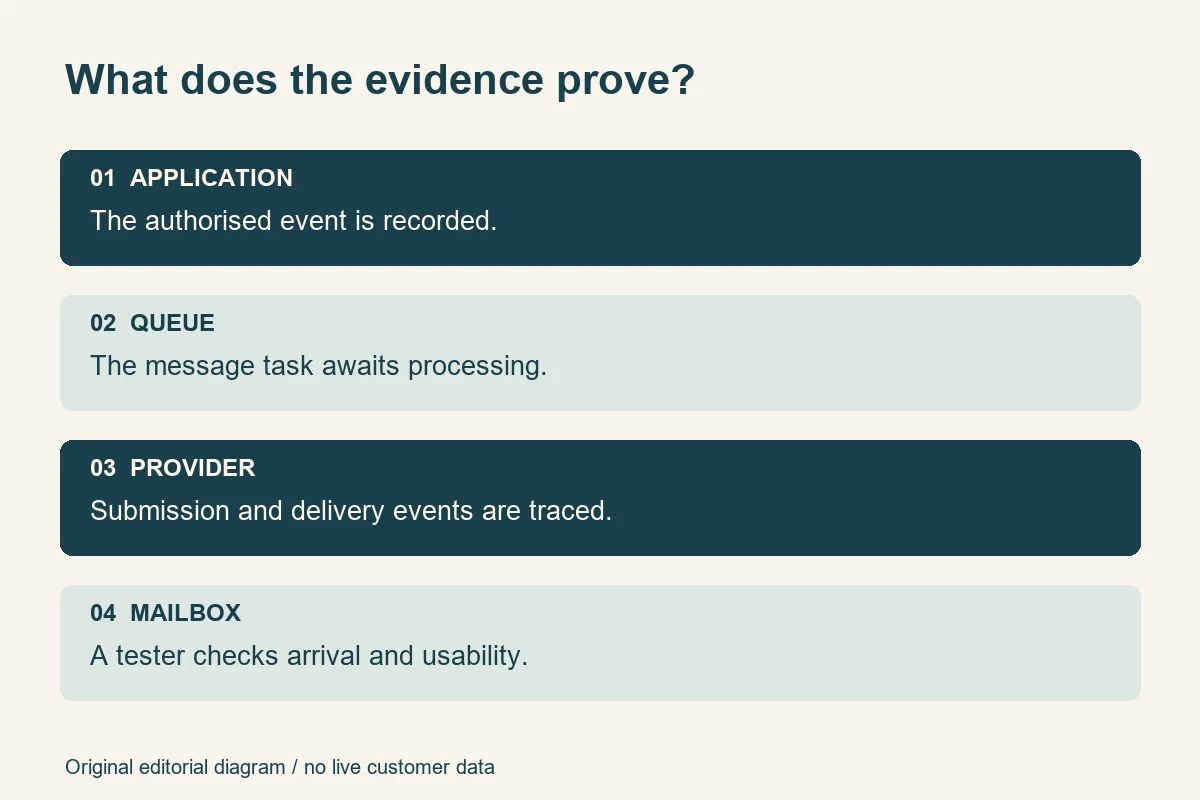
A useful acceptance discussion asks what produced each status. Does “sent” mean a background task was created, a provider API accepted the request, or the destination server accepted the message? Without that definition, a status can look more conclusive than its evidence.
| Observed stage | What it can establish | What still needs checking |
|---|---|---|
| Application event recorded | The intended business event exists | Whether a message was created for the right recipient |
| Message queued | A task is waiting for processing | Whether a worker processes it successfully |
| Provider accepts submission | The sending service accepted the request | Later rejection, deferral or recipient-server acceptance |
| Delivery event recorded | The provider reports the relevant delivery-stage outcome | Inbox placement, rendering and customer action |
| Controlled mailbox observation | A tester found and inspected that message | Other providers, recipients and future sending conditions |
Read the chosen provider's definitions. Postmark's delivery webhook documentation, for example, distinguishes recipient-server acceptance from arrival in the inbox. That distinction is valuable when writing your own acceptance criteria; another provider's event names must be checked against its documentation.
A test inbox observation is stronger evidence about that particular message's appearance, but still a sample. It cannot guarantee universal future delivery. Ask the supplier to record timestamps and identifiers so a reviewer can join the application event, sending record and observed message without relying on matching subject lines alone.
Verify sender identity and domain evidence
The visible sender should make sense to a customer who has just used your website. Check the display name, From address, Reply-To address and the actual sending domain. A familiar brand name attached to an unrelated address can undermine confidence even when the message technically arrives.
Ask the implementation team to identify the authenticated domain and supply redacted evidence from a received test message. DNS records alone show configuration intent; a received message's authentication results help show what happened on the tested sending path. Keep private keys, API credentials and full customer headers out of the acceptance document.
Google's current sender guidelines distinguish requirements for all senders to personal Gmail accounts from additional bulk-sender requirements. They cover authentication, transport and other sending conditions. Apply the requirements relevant to your actual traffic; do not reduce them to “buy an SMTP plugin” or promise that authentication guarantees an inbox.
Make DNS changes a coordinated technical task
Ask who manages the domain, which existing services send mail and how the proposed change was checked against them. Avoid copying a generic record into production or replacing working settings without understanding dependencies. The buyer's acceptance requirement is documented configuration and verified results, not performing unfamiliar DNS surgery during a launch call.
Request a named owner for the sending account, billing, renewal notices and incident alerts. Refer to the website ownership and access handover checklist for broader control arrangements. This email test should establish that the identified owner can obtain delivery evidence and respond when sending stops.
Build a controlled test plan
Choose a small set of authorised test recipients that reflects the people using the website. It might include a personal mailbox, a business mailbox and the operational destination used by your team. Select actual relevant services rather than treating one convenient address as representative of every customer.
Record the environment, application release, template version, sending route and test time. An attractive staging preview can pass while production uses different credentials or old templates. Conversely, staging should not casually send real-looking messages to customers. Agree safe routing and unmistakable test labels, then confirm production does not retain those restrictions accidentally.
Use a compact acceptance worksheet
For every test, record the trigger, expected recipient, expected number of messages, expected content, evidence required and outcome. Add a field for exceptions and a responsible owner. A useful result might say “recipient server accepted; message observed in junk folder; content correct; placement issue under investigation,” rather than marking the whole journey green.
Test the message through the real website action as well as through a provider's send-test control. The latter can help isolate configuration, but may bypass the application's event rules, recipient selection, template variables and background processing. Both tests are useful when their scope is clear.
Laravel's mail documentation describes facilities including mailables, previews, queued sending and testing assertions. In a Laravel implementation, these can support development checks. They do not replace inspecting a message that traversed the relevant operational route. Other platforms need equivalent evidence appropriate to their architecture.
Set timing expectations that match the service
Agree how quickly a time-sensitive communication needs attention, and distinguish normal processing expectations from external delivery guarantees. If a status message is delayed, the website should not invent a successful inbox outcome. Ask what users can see or do while waiting, and what support can investigate without asking them to repeat the business action.
For an Indian business serving customers across regions, check displayed dates, time zones, currency and contact hours where relevant. A technically delivered message can still confuse a reader if its next-step deadline is ambiguous. Use the same business rules as the website rather than rewriting them independently inside the template.
Review content, links and replies
Open the received HTML message and its available text alternative. Check the subject, greeting, reference, next action and contact route. Test unusually long names and missing optional fields with invented data. A template that works only with the designer's shortest sample is not ready for normal customer input.
Inspect the message on a narrow phone screen and at a larger text setting. Read it with images unavailable. Essential information should remain understandable without depending on a decorative banner. Review contrast, link wording and reading order as practical usability checks, while keeping any formal accessibility evaluation separately scoped.
Follow every action link in the controlled test. Verify the correct production hostname, secure destination, relevant page and expected access behaviour. Look for staging domains and broken relative links. If a message includes personal information or a sensitive document, agree with the responsible team whether email is an appropriate channel and what access controls apply.

Reply as a customer would
Press Reply and send a clearly labelled test response to the approved destination. Confirm that a responsible person can find it and understand the reference. A friendly invitation to reply is misleading if the address is unmonitored, rejected or routed to somebody who no longer works on the project.
If replies are intentionally unsupported, state the alternative help route clearly and verify it. Also check what happens when staff forward a message internally: does it expose more personal information than the receiving team needs? Keep operational usefulness and data restraint together instead of making every email a complete copy of the database record.
Test failures and safe recovery
Happy-path delivery is only part of acceptance. Ask the team to demonstrate a controlled sending failure, a delayed background task and a bounced recipient through supported test facilities. Do not send to random invented addresses, deliberately provoke public complaints or use real customer accounts as failure fixtures.
Amazon SES documents a mailbox simulator for specific sending scenarios. Its addresses work through SES rather than as a universal test destination for every provider. Use your chosen service's supported tools and check their limitations, costs and environment requirements before running a test.
For queue-based implementations, ask how failed tasks become visible and how support decides what to retry. Laravel's queue documentation covers failed-job handling and retry facilities. The business requirement is that failure has an observable state and an owner; a developer must adapt implementation details to the deployed application.
Reconcile an uncertain send before retrying
A timeout does not always prove that nothing was submitted. The service might have accepted a request before the application lost its response. Ask what evidence is checked before retrying and how the implementation avoids generating multiple communications for the same authorised event. A reference linking the business event to sending attempts makes that investigation more reliable.
Repeat a controlled event or supported callback and inspect the result. Agree which repeated messages are legitimate updates and which are duplicates. Do not prescribe one universal retry interval: the right policy depends on message urgency, provider behaviour and the application's ability to establish what already happened.
Postmark's bounce webhook documentation illustrates how delivery problems can be communicated back to an application. Ask how your system validates, records and acts on equivalent notifications. A failed address should produce an appropriate investigation or correction route, not an endless stream of identical retries.
Work through an acceptance example
Imagine a fictional Delhi equipment-service business sending a customer acknowledgement after storing a service request. The message should identify the request, explain the next step and provide an approved help route. It should not promise a visit time that the scheduling team has not confirmed.
The first test creates one request using an authorised mailbox. The reviewer records the request reference, message identifier and observed arrival time, then checks the displayed details and reply route. The result is specific: one acknowledgement observed for the correct recipient, with the expected information. It is not a claim that every future customer will receive mail instantly.
The second test delays the sending task through a controlled mechanism. The request remains safely recorded while support can see that communication is pending. After processing resumes, the reviewer checks whether the acknowledgement is still accurate. A message written as though the action happened “just now” might be inappropriate after a significant delay.
The third test simulates a delivery failure using the provider's supported route. Support locates the failure and follows the agreed correction procedure. The customer does not need to create another service request solely to repair an email problem. Finally, a repeated processing attempt checks that recovery does not create an unintended duplicate.
Turn observations into a clear launch decision
Suppose the acknowledgement appears in the test recipient's junk folder. Preserve that observation, check the message's authentication results and compare the outcome across the approved sample. The supplier should investigate the relevant sending conditions rather than ask the buyer to mark the test passed because the message exists somewhere. Equally, one junk-folder observation does not establish that the provider is universally defective.
Now suppose the provider has no record of the expected message. Start earlier in the chain: confirm the business event, recipient decision and queue processing. Rewriting the subject line is unlikely to resolve a message that was never submitted. This stage-by-stage investigation helps the buyer ask the next useful question without prescribing the developer's fix.
Where the provider reports recipient-server acceptance but the tester cannot locate the message, record that distinction. Check the approved mailbox's folders and any relevant business-mail quarantine with its administrator. Do not expose customer credentials or ask for unrestricted mailbox access just to complete the worksheet.
Classify remaining issues by customer consequence and available workaround. A broken essential action link might block release; a minor spacing problem might be accepted with a named correction date. A delayed acknowledgement could require a stronger on-screen reference and an operational escalation route. These are business decisions to agree explicitly, not an excuse to describe an incomplete test as successful.
Finally, state what would trigger retesting. Changes to the sending provider, domain configuration, message template, queue infrastructure or recipient-selection logic can invalidate earlier evidence. Retest the affected path after a material change rather than repeating every unrelated website check. Keep the previous result attached to its original release so the record remains truthful.
Request a usable evidence pack
Ask for the message register, completed tests, redacted received samples, relevant provider events and unresolved issues. Include the tested release, sender configuration summary and named operational owner. Prefer a concise evidence trail that another reviewer can follow over a large folder of unlabelled screenshots.
Keep the pack proportionate. Record identifiers and outcomes without circulating credentials, authentication tokens, unnecessary message bodies or real customer data. Agree who can access the evidence and when test records should be removed. Retain enough information to reproduce a defect while respecting the purpose for which it was collected.
Use the website design brief template to establish communication responsibilities early. Near launch, separate a missing agreed email feature from a new request for additional messages. That distinction helps the team fix defects without disguising scope changes as testing failures.
For continued operation, record email monitoring and incident response in the website maintenance and support agreement. Launch acceptance is a point-in-time review. It should lead to a practical ownership arrangement when a provider changes requirements, credentials expire or a background worker stops.
Avoid common testing mistakes
- Accepting “sent” without its definition. Record the stage and evidence behind the label.
- Testing only a preview. Exercise the real trigger, recipient selection and sending route.
- Checking one mailbox once. Use a justified sample and disclose its limits.
- Changing authentication blindly. Coordinate existing senders and verify the resulting path.
- Ignoring replies. Confirm that the promised help route reaches its responsible team.
- Retrying every uncertain outcome. Reconcile evidence and apply duplicate protection first.
- Promising inbox placement. Describe observed results and continued monitoring instead.
Use the launch checklist
- Every operational message has a defined trigger, audience, purpose and content owner.
- The tested sending route and environment match the planned release.
- Sender identity, relevant authentication evidence and reply handling have been reviewed.
- Application, queue and provider states have clear meanings.
- Controlled recipients have been checked for arrival, placement and usable content.
- Links, mobile presentation, optional fields and essential text have been tested.
- Supported failure tests demonstrate visible problems and responsible handling.
- Uncertain submissions and retries have duplicate-resistant recovery rules.
- Redacted evidence, unresolved exceptions and monitoring responsibilities are recorded.
Approve communication you can explain
A good launch decision does not require a claim that email can never fail. It requires clarity about what the website sends, why it sends it, what each status means and how the business responds when communication breaks down. Authentication, delivery evidence, customer readability and recovery each contribute to that decision.
For a new build or an existing site's communication review, contact Web Solution Centre with your platform, message types and known problems. Agree the testing scope and operational responsibilities before approval. The useful outcome is a traceable, maintainable customer communication process, with honest limits and a practical response to exceptions.
Sources
Primary documentation checked on 2 November 2026. The buyer worksheet and fictional exercise are editorial recommendations; provider examples do not imply an endorsement or a requirement to use that service.
- Google: sender requirements for personal Gmail accounts
- Postmark: delivery event meaning
- Postmark: bounce notifications
- Laravel 12: mail features and testing
- Laravel 12: queues, failures and retries
- Amazon SES: controlled simulator scenarios
- Featured illustrative photograph: Anete Lusina, Pexels
- Pexels: free use, modification permission and restrictions