

 Contact Us

Your checkout can accept a payment for an order your business cannot deliver. A customer enters a perfectly valid PIN code, sees a reassuring shipping option and pays. Only afterwards does the operations team discover that the parcel, destination or selected service falls outside the agreed delivery rules. The website worked technically; the commercial promise failed.
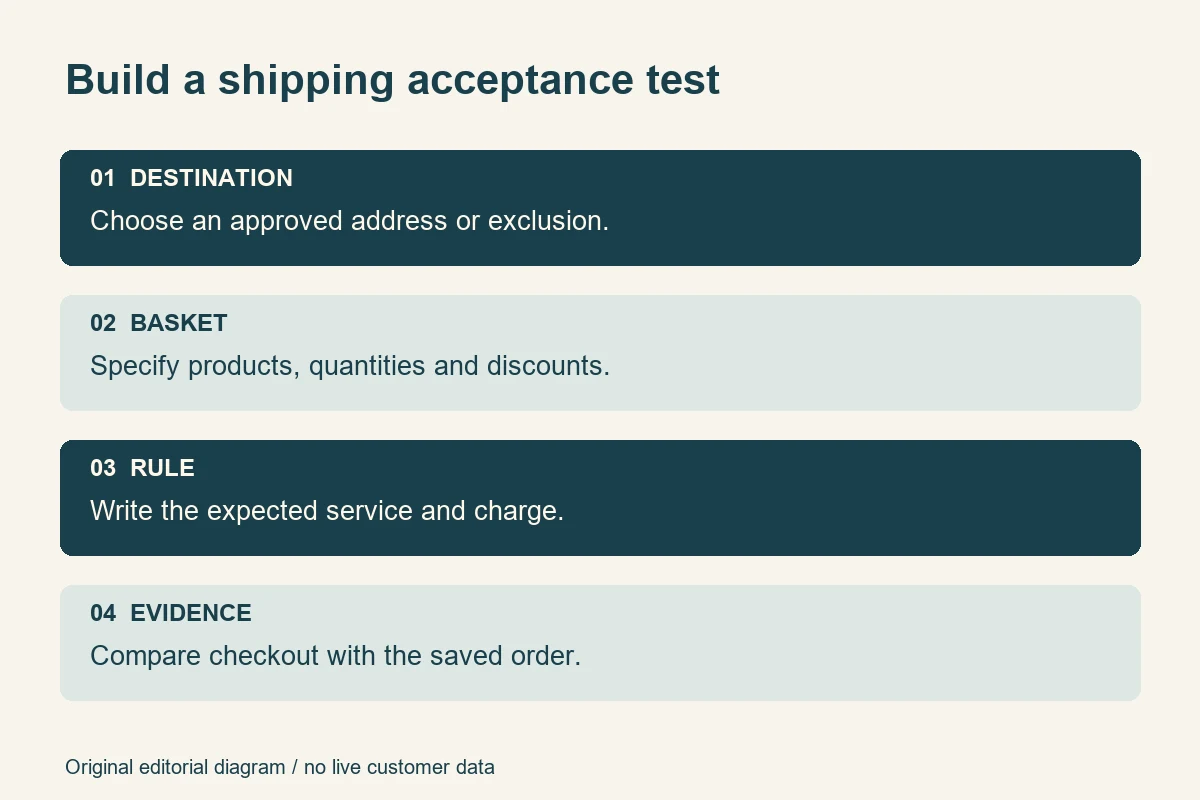
Before launch, test ecommerce shipping against a written set of expected outcomes: which addresses and products are eligible, what each basket should cost to deliver, how discounts and weight affect the quote, what happens when a courier returns no rate, and what delivery estimate the customer sees. Compare the storefront, checkout and saved order using controlled test data.
This guide is for Indian business owners and project managers accepting an ecommerce build or a shipping integration. It concentrates on serviceability and shipping calculations. Payment authorisation, settlement and refunds belong to a separate ecommerce payment testing exercise. Examples below are fictional worksheets, not WSC client results, courier tariffs or universal platform settings.
Write the shipping rules before testing
A screenshot showing “Standard delivery” is weak evidence when nobody has agreed what standard delivery means. Start with a small rule sheet approved by the person responsible for fulfilment. Marketing, finance and the implementation team should be able to read the same document without interpreting a banner differently.
Record the dispatch origin, covered destinations, excluded products, supported services, charging basis and any minimum order conditions. State whether the customer pays per order, parcel or shipment. Record the currency and obtain the business's approved treatment of tax and additional fees. The implementer should configure those decisions, rather than quietly choosing a policy during development.
Give every promise an owner
Assign one business owner to delivery coverage, another if necessary to pricing, and a named technical owner to the integration. A developer can investigate a missing quote. They cannot confirm that a courier will carry a restricted product without operational evidence. Where an answer depends on the courier account or contract, retain that confirmation privately with the project record.
Put the agreed rules into your website design brief. Include the places customers encounter them: product pages, the basket, checkout, order confirmation and the shipping policy. Contradictory wording can create a customer dispute even when the calculation follows the configured rule exactly.

Separate a valid address from a serviceable address
An address field can reject malformed input while still accepting a destination your business cannot serve. Treat format validation, geographical coverage and product-specific delivery eligibility as separate checks. A six-digit PIN code alone does not prove that a particular parcel can be delivered by the selected method.
Use business-approved test destinations from your actual coverage list. Include an ordinary serviceable address, an excluded destination, a boundary case and a valid address outside your launch territory. Use synthetic names and controlled contact details. Avoid copying customer records into test reports or screenshots.
Change the address after a successful quote
First obtain a quote for an eligible destination. Then edit the address to an excluded destination without clearing the basket. The previous shipping service must not remain selectable simply because it was valid a moment earlier. Confirm the visible message, available methods and total all reflect the new destination before purchase.
Repeat the exercise with a saved address and with a fresh guest checkout. Ask whether an early product-page PIN-code checker and checkout use equivalent coverage rules. If the early checker is only indicative, make that limitation clear. It should not promise delivery where the final system consistently refuses it.
Platform behaviour differs. WooCommerce's shipping-zone documentation explains that a customer matches the first applicable zone and that specific zones should precede broader ones. A broad zone placed first can therefore conceal the intended local rule. On Shopify, markets and shipping zones both affect whether customers can order from a country. Test the installed configuration rather than assuming another platform's model applies.
Build a useful shipping test matrix
Do not begin with every possible combination. Choose cases that expose a different rule or boundary, then expand when a failure suggests more risk. A compact, deliberate matrix is more useful than dozens of screenshots of the same ordinary basket.
The following worksheet is illustrative. Replace its scenarios with your own products, approved destinations and expected charges. Write the expected result before running checkout; otherwise it is easy to rationalise an unexpected charge as correct.
| Scenario | Change to make | Evidence to record |
|---|---|---|
| Ordinary eligible order | One standard product, covered address | Available service, charge and saved order |
| Coverage boundary | Replace the address with an excluded destination | Old quote removed; clear recovery message |
| Free-delivery threshold | Move below, onto and above the agreed threshold | Correct qualifying amount and charge |
| Discounted order | Apply a permitted coupon to the same basket | Recalculated eligibility and final total |
| Heavy or special item | Add the relevant variant or quantity | Correct weight or special handling rule |
| Mixed basket | Combine items with different shipping rules | Shipment grouping and total customer charge |
| Rate-service failure | Simulate an unavailable rate response safely | Approved fallback or clear blocked checkout |
Add fields for the test identifier, environment, configuration date, product variant, destination identifier, expected result, observed result and evidence reference. A failed case should identify who decides the correction and who retests it. “Shipping issue” is too vague to reproduce after the meeting ends.
Keep the scope proportionate. A single-origin store with one flat rate needs fewer combinations than a catalogue mixing fragile goods, heavy products and multiple dispatch locations. When commissioning an ecommerce website, ask for the acceptance matrix alongside the feature list.
Check discounts, thresholds and parcel weight
Define which amount qualifies for free delivery
Imagine a fictional store offering free standard delivery from an eligible merchandise amount of ₹1,500. A basket starts at ₹1,600 and a valid ₹200 discount reduces that amount to ₹1,400. If the approved rule uses the amount after discount, free delivery should disappear. If the business intends a different basis, record it explicitly and confirm that the platform can implement it.
Test ₹1,499, ₹1,500 and ₹1,501 where those values are possible in the test catalogue. Repeat with a coupon, a quantity change and removal of the qualifying item. Watch the explanatory message as well as the number: a stale “You qualify for free delivery” banner is still a defect if checkout now charges shipping.
Shopify's current rate-testing guidance states that price-based rate conditions use the discounted cart value before tax. It also identifies product weights, packaging and profile configuration as relevant troubleshooting inputs. These are platform-specific facts, not a reason to assume every custom store calculates eligibility identically.
Test the parcel inputs behind the quote
Ask the fulfilment team to approve the test product's weight and packaging assumptions. Check the selected variant, not only the parent product. A small item and a larger pack can share a product page while requiring different shipping inputs.
For a fictional weight-based rule, test just below, exactly at and just above the configured boundary. Include a multi-quantity basket. If dimensional or chargeable weight affects the connected carrier quote, ask the implementer to show which dimensions and units are sent. Do not infer that a cheap quote proves those inputs are correct.
Record whether the website charge is an intentional retail shipping price or an estimate derived from a carrier response. The customer charge and the eventual courier invoice need not be identical. They should follow an approved commercial rule that the business understands.
Test mixed baskets and multiple origins
Two products that ship correctly alone can behave differently together. One might use a special shipping profile, another a separate warehouse, and a third local pickup only. Test representative combinations before accepting a reassuring single-product demonstration.
For each combination, ask whether the customer is buying one shipment or several, whether every item is eligible at the chosen address, and how the total is presented. Avoid a checkout that looks like one standard delivery but silently assumes separate parcels or incompatible services.
Shopify's shipping-rate documentation describes rates and links to the rules for combinations across profiles and locations. Use the rules applicable to the store's current shipping setup, then confirm the customer-facing outcome directly. An unexpectedly doubled charge can be a deliberate combination, a configuration mistake or a mismatch with your intended policy.
Make partial eligibility explicit
Suppose a fictional basket contains a normal parcel and an oversized item that cannot go to the selected destination. Agree whether the whole order is blocked, the customer can remove the restricted item, or a separate quotation process is offered. The interface should explain the affected item and preserve the rest of the basket.
Repeat after changing stock location or the eligible variant in a controlled environment. Save the shipment grouping shown in the administrative order view. If the storefront and operations team interpret the order differently, resolve that discrepancy before taking public orders.
Demonstrate failures and fallback rates
Ask the implementer to simulate failure in staging or through an approved test facility. Do not disconnect a live courier account during trading merely to prove a point. Relevant cases include a timeout, an empty response, expired authentication and a response that cannot be interpreted.
The important question is what the buyer can safely conclude. “No service to this address” should not be the default explanation for every technical failure. A temporary rate lookup problem and a genuinely excluded destination require different recovery paths.
Shopify documents backup rates for cases where all app or carrier-calculated rates for a shipment fail and no other eligible rate is available. Review what the store actually uses, including any platform-provided fallback. A fallback price must still be commercially acceptable for the parcels and destinations it could cover.
Agree the safe fallback before enabling it
A free or low flat rate may keep checkout moving while exposing the business to a delivery cost it never approved. Conversely, blocking every uncertain order can be reasonable for an oversized or specially handled product. Choose the behaviour with operations and finance rather than treating completion rate as the only objective.
During the test, capture the failure condition, visible message, offered methods and final order state. Confirm the technical team can distinguish a fallback quote from an ordinary one in its diagnostic evidence. After restoring the service, start a fresh checkout and verify normal quotes return.
Make delivery estimates understandable
“Dispatches in two working days” and “delivered in two days” are different promises. Record whether the estimate includes preparation, collection and transit. Specify the start point, relevant business days and any order cutoff. Use the business's approved wording rather than copying a courier service name into a guarantee.
Test a normal weekday, a cutoff boundary and an excluded dispatch day using controlled dates where the system permits. Include a product with a longer preparation period. If a mixed order has different arrival windows, the customer should understand that before completing checkout.
Keep the SEO implications in proportion. Google's merchant-listing documentation supports shipping information including handling and transit time. Any implemented markup should describe the real offer and visible policy. Passing a structured-data check does not prove a courier can meet the estimate, and this shipping test does not guarantee a search appearance.
Compare a small sample of product-page promises with checkout and confirmation wording. Flag a global “free delivery everywhere” banner if exclusions exist. Fix the narrow inaccurate promise rather than hiding essential conditions in a policy link customers only discover after purchase.
A practical sign-off exercise for a small Indian store
Consider a fictional home-accessories business dispatching from one warehouse. It sells standard items and a bulky storage basket. The owner approves free standard shipping above a defined discounted merchandise total, while the bulky item has a separate destination restriction. These are invented conditions for the exercise, not recommended tariffs or a description of any WSC project.
The project manager prepares four baskets: a standard order below the threshold, the same order with enough quantity to qualify, a qualifying order reduced below the threshold by a coupon, and a mixed order containing the bulky item. Operations supplies one covered destination and one excluded destination. The team writes the expected service and charge for each meaningful combination.
During the demonstration, the standard qualifying order shows free delivery. That proves the ordinary case. The tester then applies the coupon and checks whether the charge and qualification message change together. Next, the tester removes the bulky item from the mixed basket after an exclusion message. Checkout should recover according to the agreed rule, without forcing the shopper to rebuild an otherwise valid order.
Finally, the implementer demonstrates an unavailable rate response through the approved test mechanism. The owner sees the actual fallback price and decides whether it is acceptable. If the implementation permits the order but operations cannot support the offered service, the case fails even though the checkout button works.
The resulting decision record is specific: tested baskets, covered destinations, outstanding exclusions, fallback behaviour and the person accepting any limitation. It does not claim every Indian PIN code has been tested. When a new product class or warehouse is introduced, the owner can extend this same worksheet rather than starting from an undocumented demonstration.
Collect evidence and assign decisions
For each important case, keep the rule-sheet version, product identifiers, controlled destination, expected result and actual quote. Add a screenshot or short recording of the customer journey and a reference to the saved test order when one is created. Redact access tokens, personal information and private carrier-account details.
The report should distinguish a calculation defect, missing configuration, an unresolved business decision and an external-service limitation. They need different owners. A developer should not close an excluded-destination failure merely by making the error message friendlier if the business expected that destination to be covered.
Include customer-facing evidence from a mobile device as well. Check that long service names, conditional charges and explanatory messages remain readable at the point of selection. A correct amount is less useful if the shopper cannot tell which option it belongs to. For payment-specific delivery restrictions, such as a separately configured cash-on-delivery rule, include an explicit test only where the store actually offers that option.
Retest the exact failed combination
After a correction, repeat the same basket and destination, then a neighbouring case that could have been affected. If a threshold changes, test both sides again. If zone order changes, test the narrow and broad regions. Mark the original defect resolved only when the evidence supports it.
Use a fresh session when testing saved-rate behaviour and record what changed. WooCommerce's core shipping troubleshooting guidance includes checking matched zones and methods. Keep diagnostic notices and debugging tools away from public customers after the investigation.
Finish with named ownership for future edits. Who changes serviceability, updates product weights and reviews courier notices? Agree when a change requires a small regression run. The website handover record should include that responsibility and the location of the current rule sheet.
Avoid common acceptance mistakes
- Testing only your office address: it proves one destination, not your advertised coverage.
- Using only a light, ordinary product: special variants and mixed baskets remain untested.
- Accepting the displayed total as the expected total: write the rule and independent expectation first.
- Ignoring the coupon step: a discount can change the amount used for shipping eligibility.
- Confusing unavailable with unserviceable: a lookup failure does not establish geographical exclusion.
- Approving vague delivery promises: record preparation, transit and relevant cutoff assumptions.
- Changing live settings for a demonstration: use controlled tests and preserve the current working configuration.
Use the launch checklist
Before signing off, ask the business and implementation owners to confirm the following:
- Covered destinations, exclusions and product restrictions have an approved written source.
- Guest checkout, saved addresses and address changes recalculate the available methods.
- Charges match independently written expectations for ordinary and boundary cases.
- Discounts, quantities, variants and package inputs have representative tests.
- Mixed baskets reveal the correct shipment grouping and total charge.
- Rate failures produce an approved fallback or an understandable recovery route.
- Visible delivery estimates distinguish preparation from transit and avoid unsupported guarantees.
- The saved order preserves the selected service and agreed customer charge.
- Defects have owners, retest evidence and an explicit launch decision.
- Future coverage and rate changes have a named owner and regression checklist.
Decide what is ready to launch
Shipping acceptance does not eliminate courier disruption or make every delivery predictable. It establishes something narrower and useful: the website applies the business's approved eligibility and charging rules, communicates limitations clearly and responds safely when a quote cannot be obtained.
Prioritise failures that allow an undeliverable order, charge the wrong amount or present an unsupported promise. Record smaller limitations honestly, with an owner and an agreed resolution. If you are planning a build, discuss the delivery scenarios with WSC while scope is being defined. A concrete test basket and expected result are better starting points than a checkbox labelled “shipping integration”.
Sources
Primary documentation checked on 3 November 2026. Platform features and administration screens can change; confirm the installed version, account and shipping setup.
- Shopify: troubleshooting and testing shipping rates
- Shopify: shipping zones and markets
- Shopify: shipping rates
- Shopify: backup shipping rates
- WooCommerce: setting up shipping zones
- WooCommerce: troubleshooting core shipping
- Google Search Central: merchant-listing structured data
Image credits: illustrative parcel photography by Artem Podrez and document-review photography by Hanna Pad, used and adapted under the free Pexels licence. These photographs do not depict WSC clients, staff or tested orders. The shipping test diagram is original editorial artwork.